5 Best YouTube Creator Equipment for Beginners (2026 Guide)
Best YouTube Creator Equipment for Beginners
Starting a YouTube channel does not mean you need an expensive studio. The right microphone, lighting, camera and phone support can help you build a practical recording setup at home.
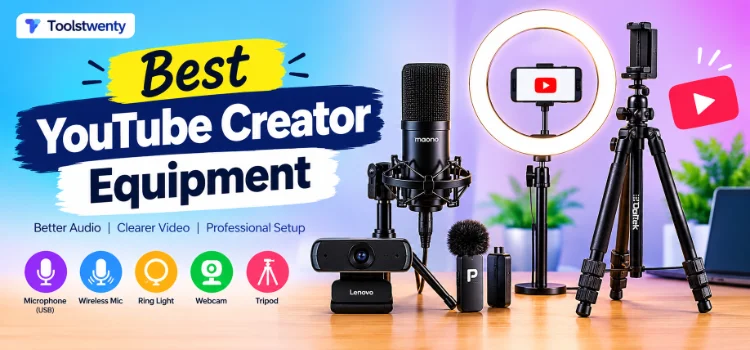
This guide to the best YouTube creator equipment for beginners covers five useful options for audio, lighting, video and camera support, along with what to consider before buying.
Explore the Equipment ↓Whether you make tutorials, educational videos, product demonstrations, gaming content or talking-head videos, your equipment should match the way you create content. Start with the items that solve your biggest recording problems rather than buying everything at once.
5 Best YouTube Creator Equipment Picks
These YouTube creator equipment picks cover audio, lighting, video and camera support. Each serves a different purpose, so choose according to your recording setup and budget.
1. MAONO AU-A04 Condenser Microphone Kit
For desktop tutorials, voiceovers and spoken content
The MAONO AU-A04 is a USB condenser microphone kit designed for creators who record their voice at a desk. A dedicated microphone can be useful when your built-in computer microphone does not provide the recording experience you want.
- Condenser microphone with USB connectivity
- Boom arm for positioning the microphone
- Pop filter and shock mount included in the kit
- Useful for voiceovers, tutorials and podcasts
Consider before buying: Check the included cable, your computer’s ports and the available desk space for the boom arm. A condenser microphone can also pick up surrounding room noise.
Check Microphone on Amazon ↗2. Portronics Dash 7 Wireless Microphone
For mobile recording and on-camera videos
The Portronics Dash 7 is an omnidirectional wireless lapel microphone with a Type-C receiver. It is designed for creators who want to record while speaking to a phone instead of remaining beside a desk microphone.
- Wireless microphone with Type-C receiver
- Plug-and-play style connection
- Noise-cancellation feature listed by the seller
- Useful for vlogging, demonstrations and mobile videos
Consider before buying: Confirm your phone’s connector and compatibility. Android OTG settings or recording-app support may affect whether an external microphone works correctly.
Check Wireless Mic on Amazon ↗3. DIGITEK DRL-14C LED Ring Light
For indoor videos and talking-head recording
Lighting can make a difference when you record in a room with uneven or limited light. This DIGITEK ring light listing includes a stand and smartphone mount, making it an option to consider for a simple home recording setup.
- LED ring light with stand
- Three colour modes listed in the product details
- Adjustable brightness and colour temperature
- Smartphone mount for supported phone setups
Consider before buying: Check the ring light’s dimensions, stand height and power requirements. Position the light comfortably and avoid relying on it as your only light in every environment.
Check Ring Light on Amazon ↗4. Lenovo 300 FHD Webcam
For desktop tutorials, meetings and presentations
The Lenovo 300 FHD Webcam is a USB webcam with Full HD 1080p video and two built-in microphones. It can be considered by creators who record at a computer and want a dedicated camera instead of using a laptop’s built-in webcam.
- Full HD 1080p video capture
- 95-degree wide-angle lens listed in the product details
- Two built-in microphones
- USB connection and adjustable mounting
Consider before buying: Check your computer’s operating-system requirements, USB port and preferred recording software. A webcam is intended for compatible computer setups, not as a direct replacement for every phone camera.
Check Webcam on Amazon ↗5. DIGITEK DTR-550 LW Tripod Stand
For phone videos, framing and stable shots
A tripod can help keep a phone or compatible camera in a consistent position while recording. The DIGITEK DTR-550 LW is listed as a 67-inch tripod with a phone holder and 360-degree ball head.
- Maximum height listed as 67 inches
- Phone holder and 360-degree ball head
- Aluminium alloy legs with flip locks
- Maximum load capacity listed as 5 kg
Consider before buying: Check that your phone holder fits your device and keep the tripod on a level surface. Do not exceed the specified load capacity.
Check Tripod on Amazon ↗Quick Comparison: Which Equipment Do You Need?
Compare the main purpose of each item before deciding which YouTube creator equipment to buy first.
| Equipment | Main purpose | Consider it if you… |
|---|---|---|
| MAONO AU-A04 | Voice recording | Record at a desk or create voiceovers |
| Portronics Dash 7 | Wireless audio | Record videos on a compatible phone |
| DIGITEK DRL-14C | Lighting | Need more control over indoor lighting |
| Lenovo 300 FHD | Computer video | Record through a desktop or laptop |
| DIGITEK DTR-550 LW | Stable camera support | Need a steady phone or camera position |
How to Choose the Best YouTube Creator Equipment
The best YouTube creator equipment depends on your content style, recording device and budget. A simple setup can be enough when every item serves a clear purpose.
1. Start with the type of videos you make
If you create screen tutorials with voiceovers, a desk microphone may be more relevant than a ring light. If you record yourself speaking to a phone, lighting and a compatible wireless microphone may be more useful. Choose equipment for your actual workflow.
2. Improve one thing at a time
You do not need to purchase all five items together. Identify the biggest limitation in your current setup, then prioritise that purchase. Better lighting cannot fix unclear audio, and a microphone cannot correct a poorly framed shot.
3. Check compatibility before ordering
Review connector types, computer requirements, phone support, mounting options and included accessories on the product listing. Similar product names can refer to different versions or bundles.
4. Compare the current price and seller details
Amazon prices, stock, offers and seller information can change. Check the current listing, delivery information, return terms and warranty details before placing an order.
5. Remember that equipment is only one part of a video
Clear explanations, useful information, appropriate titles and a well-planned video matter too. Equipment should support your content rather than replace good preparation.
Frequently Asked Questions About YouTube Creator Equipment
Here are answers to common questions about choosing the best YouTube creator equipment for a beginner-friendly setup.
What equipment does a beginner YouTuber need?
Start with a device you can record on, clear audio and suitable lighting. A tripod or webcam may also help depending on whether you record with a phone or computer. The best YouTube creator equipment is the setup that meets your current needs.
Should I buy a USB or wireless microphone?
A USB microphone can suit desk-based tutorials and voiceovers. A wireless lapel microphone may be more practical for mobile recording and on-camera videos, provided it is compatible with your device.
Is a ring light necessary for YouTube videos?
No. A ring light is one option for improving indoor lighting, but daylight or another suitable light source may also work. Choose based on your recording environment and video style.
Can I use a webcam to record YouTube videos?
Yes. A compatible webcam can be useful for desktop tutorials, presentations and computer-based recordings. Check its operating-system and software compatibility before buying.
Do I need all five pieces of equipment to start?
No. You can start with the equipment that solves your biggest recording problem. Upgrade gradually as your channel and recording workflow develop.
How do I choose the best YouTube creator equipment on a budget?
Prioritise your biggest need first: audio, lighting or stable camera positioning. Compare current prices, product specifications, compatibility and return terms before ordering.
Free YouTube Tools from Toolstwenty
Equipment helps you record your videos, but planning and reviewing your content is another part of the process. Try these free Toolstwenty utilities as you prepare and manage your YouTube videos.
Explore title ideas for your next video topic and refine the wording before publishing.
Inspect publicly available video tags where the YouTube API provides them.
Review public video statistics such as views and other available video details.
Calculate playlist duration and plan the time needed to watch a video collection.
Access available thumbnail images for a YouTube video using its URL.
These tools support different parts of your YouTube workflow. Choose the one that matches the task you want to complete.
Final Thoughts on the Best YouTube Creator Equipment
The best YouTube creator equipment is not necessarily the most expensive. Choose products that suit your recording style, check compatibility and improve your setup one step at a time. Clear audio, suitable lighting and stable framing can help you create more practical videos.
Compare the specifications and compatibility of each option before buying. Start with what you need most, build your setup gradually and focus on making videos that genuinely help or interest your audience.
As an Amazon Associate I earn from qualifying purchases.