
Lorem Ipsum Generator
How to Use the Lorem Ipsum Generator
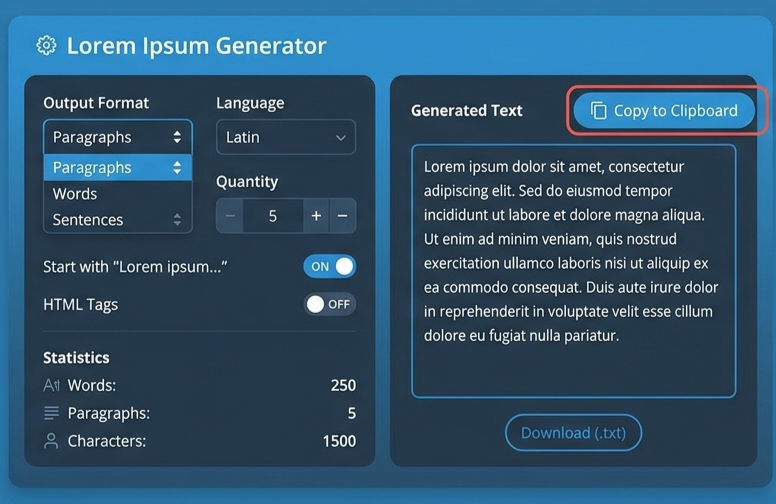
Creating placeholder text with our free Lorem Ipsum generator is simple. Follow these four quick steps to generate and use Lorem Ipsum text.
Choose Your Content
Select the type of content you need, such as paragraphs, words, sentences, headings, or lists.
Select a Format
Choose your preferred output format, including Plain Text, HTML, or Markdown.
Generate Text
Generate Lorem Ipsum instantly based on the content type and settings you selected.
Copy or Download
Copy your generated text or download it as a TXT or HTML file for your project.
What is a Lorem Ipsum Generator?
A Lorem Ipsum Generator is an indispensable online developer tool built for web designers, frontend engineers, graphic artists, and content strategists who require clean placeholder text for digital mockups. Often referred to as a dummy text generator or blind text generator, it creates structured filler text that mirrors the rhythm and visual distribution of actual human language without introducing readable content that could distract stakeholders.
Originating from classical Latin literature written by Cicero in 45 BC, lorem ipsum text has been scrambled over centuries to obscure its literal meaning. Whether you are crafting website UI prototypes, wireframing mobile applications, or formatting editorial layouts, using a dedicated lipsum generator allows you to test designs rapidly with realistic textual proportions.
Why Designers and Developers Need Dummy Text
When sharing initial wireframes or template designs with clients and team members, using actual readable text can derail productive feedback. Viewers naturally tend to read and proofread copy rather than focus on spatial design, typography, color balance, and component alignment.
Integrating lorem lipsum text into your design workflow offers several core advantages:
- Eliminates Content Distraction: Keeps the focus purely on structural elements like margin spacing, font choices, button placements, and visual hierarchy.
- Simulates Natural Language Flow: Unlike repeating arbitrary words like “sample text here,” standard ipsum text features natural variations in sentence length, word character counts, and paragraph distribution.
- Facilitates Multi-Screen UI Testing: Designers can evaluate how flexible containers, card grids, navigation menus, and content cards react to varying lengths of text across different viewports.
- Streamlines Layout Typography: Easily test font pairing, line heights, letter spacing, and heading styles (<h1> through <h6>) with realistic content density.
Advanced Features of Our Free Lipsum Generator
Our lorem generator goes beyond basic text creation by offering a comprehensive suite of customization features tailored specifically for modern digital workflows:
- Flexible Element Generation: Choose between paragraphs, individual words, sentences, unordered HTML lists (<ul>), distinct headings, or formatted blockquotes.
- Multiple Output Formats: Instantly convert filler text into Plain Text, clean HTML tags, or Markdown formatting suitable for documentation and README files.
- 1-Click Copy and File Exports: Utilize lorem ipsum text copy to instantly transfer your formatted output to the clipboard, or download it directly as a .TXT or .HTML file.
- Live Text Analytics: Monitor real-time statistics including total word count, character count, sentence totals, and block counts to match exact design specs.
How to Maximize Workflow Efficiency with Custom Placeholder Text
Using placeholder text effectively involves matching the filler content to the specific structural component you are building. For instance, when designing blog post templates, generating HTML-tagged paragraphs along with blockquotes and headings allows frontend developers to test CSS stylesheet rules directly within the browser DOM.
Similarly, UI designers working on navigation bars or call-to-action buttons can generate short 2-to-3-word snippets to quickly evaluate line breaks and container overflow settings. By customizing your output format before copying, you save valuable time that would otherwise be spent manually adding HTML tags or stripping unneeded formatting.
Example Lorem Ipsum Output
Lorem Ipsum is commonly used as placeholder text while designing websites, applications, and other layouts. Here is an example of the type of text you can generate.
A typical Lorem Ipsum paragraph begins with the familiar Latin-style placeholder text shown below:
Frequently Asked Questions (FAQs)
Is Lorem Ipsum actual Latin?
While lorem ipsum stems from classical Latin literature—specifically Cicero’s “De Finibus Bonorum et Malorum”—the text generated today is intentionally scrambled. Words have been added, removed, and altered so that it carries no meaningful translation.
Why not use random English text instead of a lipsum generator?
Using readable English copy causes reviewers to focus on reading the sentences instead of reviewing layout components. Dummy text keeps client feedback focused on aesthetics, typography, and structural layout.
Can I generate HTML tags with this placeholder text generator?
Yes! Our tool allows you to switch seamlessly between plain text, Markdown, and native HTML markup (including <p>, <ul>, <h1>–<h6>, and <blockquote>) so you can paste structured layout code directly into your code editor.
Is my data safe while using this Lorem Ipsum Generator?
Yes, 100%. Our placeholder text generator operates completely client-side within your browser. We do not track, collect, or store any of your generated text, settings, or personal details on our servers, ensuring complete user privacy and security.
Is this dummy text generator completely free to use?
Yes, our lipsum generator is 100% free with no hidden fees, login requirements, or usage limits. You can generate unlimited placeholder text for personal and commercial projects anytime.
More Text Tools
Latest Posts
- Bluehost Hosting Review 2026: Pricing, Plans & WordPress Hosting
- 12 Free SEO Tools for Websites & YouTube to Improve Your Content
- Systeme.io Review 2026: Pricing, Free Plan, Features & Sales Funnels
- What Is an Image Resizer? Image Dimensions, Pixels, Size & Resolution Explained
- Backwards Text: How to Write, Reverse & Copy Text Backwards
- Online Diff: The Ultimate Guide to Comparing Two Texts
- How to Remove Line Breaks in Excel, Word & Notepad
- How to Remove Duplicate Lines from Any Text (Guide)
- YouTube Title Ideas That Make Your Videos Easier to Discover
- How to Extract Tags From YouTube Videos: A Complete Guide