
What is a Case Converter?
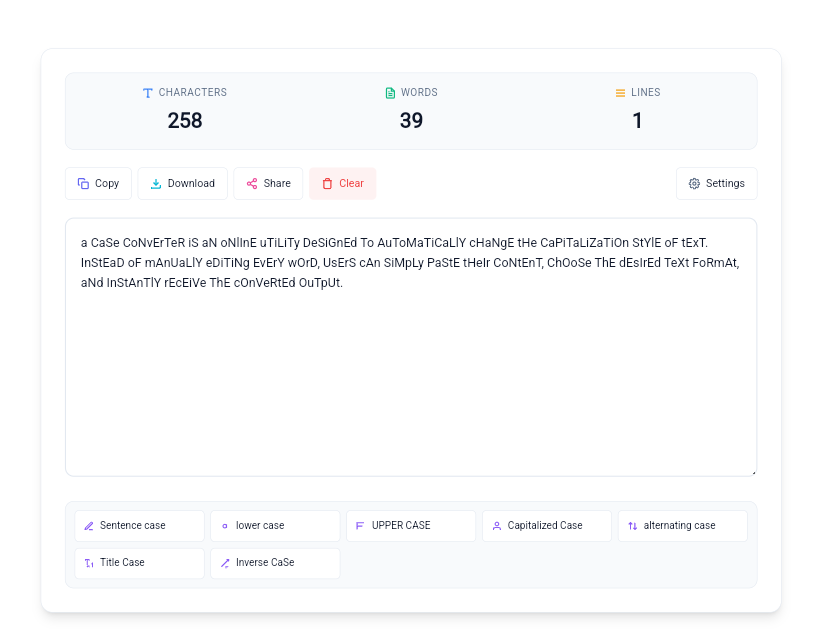
A Case Converter is an online utility designed to automatically change the capitalization style of text. Instead of manually editing every word, you can paste your content, choose the desired text format, and instantly receive the converted output.
This tool is ideal for anyone who regularly works with text and needs fast, accurate, and effortless formatting. Whether you need to fix accidental Caps Lock, prepare a heading, clean copied content, or standardize text, the converter makes the process much easier.
Text Case Conversion Examples
The same sentence can look completely different depending on the capitalization style you choose. Here are some simple examples of common text formats:
🔤 Sentence Case
This is an example sentence.
🔡 lowercase
this is an example sentence.
🔠 UPPERCASE
THIS IS AN EXAMPLE SENTENCE.
📝 Title Case
This Is an Example Sentence.
✨ Capitalized Case
This Is An Example Sentence.
🔄 Alternating Case
tHiS iS aN eXaMpLe SeNtEnCe.
Benefits of Using a Case Converter
Using a Case Converter saves time and eliminates the need to manually edit text formatting. Whether you are writing blog posts, creating social media captions, preparing academic assignments, or editing professional documents, this tool helps maintain consistent capitalization with just one click.
It reduces typing errors, improves readability, and makes it easier to keep your content in a consistent writing style.
Since text conversion happens instantly in your browser, you can work faster without installing any software or creating an account. The tool is compatible with desktops, tablets, and mobile devices, making it convenient to format text whenever you need it.
It is an excellent solution for writers, students, marketers, developers, office professionals, and anyone who frequently works with text.
Features of Our Case Converter
The tool provides several conversion modes so you can choose the format that best matches your content.
Sentence Case
Capitalizes the beginning of sentences while keeping the rest of the text in a readable format.
UPPERCASE
Converts all letters into capital letters instantly, useful for headings, labels, and emphasis.
lowercase
Changes all letters to lowercase, which is useful when cleaning inconsistent or accidentally capitalized text.
Title Case
Capitalizes the main words commonly used in titles, headings, and other title-style content.
Capitalized Case
Capitalizes the starting letter of each word for a consistent word-by-word capitalization style.
Inverse Case
Changes the capitalization of letters in the text, useful for experimenting with or correcting unusual capitalization.
Convert Uppercase and Lowercase Text
One of the most common reasons people use a Case Converter is to quickly change uppercase text to lowercase or lowercase text to uppercase. There is no need to manually retype the content.
If a block of text was accidentally typed with Caps Lock enabled, paste it into the tool and choose the appropriate conversion style. Sentence Case can also help make an all-uppercase paragraph easier to read.
Who Can Use This Tool?
Text formatting is useful across many types of work. This tool can help anyone who needs to change capitalization quickly.
- Students and educators — clean assignments, notes, and study material.
- SEO professionals — format titles, keywords, labels, and content.
- Social media managers — prepare captions and formatted text.
- Developers and programmers — clean sample strings and text values.
- Business professionals — standardize text in documents and data.
- Writers and bloggers — quickly format headings, drafts, and copied content.
When to Use a Text Case Converter
Fix Accidental Caps Lock
Turn accidentally capitalized text into lowercase or sentence-style text without typing everything again.
Spreadsheet & CSV Data
Standardize inconsistent capitalization in copied or imported text data.
Titles & Headlines
Quickly prepare consistent title-style text for articles, pages, and posts.
Social Media Content
Clean up copied captions and change their capitalization before publishing.
Copied Text
Fix inconsistent capitalization after copying text from different sources.
Coding & Development
Quickly clean up text values, labels, sample content, and strings during development work.
Practical Ways to Fix Common Text Formatting Issues
Fixing Accidental Caps Lock
If you accidentally type an entire paragraph with Caps Lock enabled, use the converter instead of manually rewriting the text.
Standardizing Spreadsheet Data
Clean inconsistent capitalization in spreadsheet or CSV content before using the data elsewhere.
Creating Better Headlines
Use Title Case or another suitable style when preparing blog titles, headings, and social media content.
Developer Text Cleanup
Quickly change capitalization of copied strings, sample data, labels, and other development text.
Why Use an Online Case Converter?
An online Case Converter gives you a quick formatting solution without requiring desktop software. You can paste your text, select a conversion style, review the result, and copy the formatted version in seconds.
The tool is useful for both short sentences and larger blocks of text, making it convenient for everyday writing, editing, content creation, and data cleanup.
How to Use the Case Converter
Converting text takes only a few simple steps:
Paste Text
Enter or paste the text you want to format.
Choose a Style
Select uppercase, lowercase, sentence case, title case, or another option.
Review Result
Check the converted text and make sure the selected style is correct.
Copy or Download
Copy the result or use the available output options for your workflow.
Case Converter for Students, Writers, and SEO Work
Students can use a Case Converter to clean up copied notes, assignments, and research text. Writers and bloggers can use it when preparing headings, captions, drafts, and other content.
SEO professionals can use different capitalization styles when working with titles, keywords, labels, and content formatting. It can also be useful when preparing text that will be reused across websites, documents, and social platforms.
If you are working with longer content, you can also use our Word Counter to check words and characters after formatting your text.
Text Privacy and Local Processing
The conversion process is designed to happen directly in your browser, making text formatting quick and convenient.
The tool also includes a local save feature that can temporarily keep your text in your browser’s local storage to help prevent accidental data loss if you close or refresh the page.
As with any online tool, avoid entering highly sensitive or confidential information unless you have reviewed the applicable privacy and data-handling information.
Frequently Asked Questions
What is a text case converter?
A text case converter is a free online tool that transforms text into different capitalization formats, including UPPERCASE, lowercase, sentence case, title case, and capitalized case.
Is this text case converter free to use?
Yes. The Toolstwenty Case Converter is free to use and does not require an account or software installation.
How do I convert uppercase text to lowercase?
Paste your uppercase text into the converter and select the lowercase option. The letters will be changed to lowercase instantly.
How do I convert lowercase text to uppercase?
Paste your lowercase text into the converter and select UPPERCASE. The text will be converted to capital letters.
What is the difference between Title Case and Sentence Case?
Sentence Case normally capitalizes the beginning of a sentence, while Title Case is generally used for titles and headings. The best option depends on how you plan to use the text.
Can I convert large amounts of text?
Yes. The tool is designed to process both small paragraphs and larger blocks of text. Very large inputs can depend on your browser and device performance.
Does the tool save my text?
The converter includes a local save feature that can temporarily keep your text in your browser’s local storage to help prevent accidental data loss if you close or refresh the page.
Is my text uploaded to a server?
The conversion is designed to happen in your browser. If you are working with sensitive content, avoid entering confidential information unless you have confirmed the applicable data-handling policy.
Can I use the Case Converter on my mobile phone?
Yes. The responsive interface is designed to work on mobile phones and tablets as well as desktop devices.
Do I need to install software?
No. You can use the online Case Converter directly in your browser without installing additional software.
Convert Text Case Quickly and Easily
Whether you need to convert small to capital letters, clean up imported notes, fix accidental Caps Lock, or standardize capitalization, an automated text formatting tool can keep your workflow fast, accurate, and stress-free.
More Text Tools
Latest Posts
- Bluehost Hosting Review 2026: Pricing, Plans & WordPress Hosting
- 12 Free SEO Tools for Websites & YouTube to Improve Your Content
- Systeme.io Review 2026: Pricing, Free Plan, Features & Sales Funnels
- What Is an Image Resizer? Image Dimensions, Pixels, Size & Resolution Explained
- Backwards Text: How to Write, Reverse & Copy Text Backwards
- Online Diff: The Ultimate Guide to Comparing Two Texts
- How to Remove Line Breaks in Excel, Word & Notepad
- How to Remove Duplicate Lines from Any Text (Guide)
- YouTube Title Ideas That Make Your Videos Easier to Discover
- How to Extract Tags From YouTube Videos: A Complete Guide