
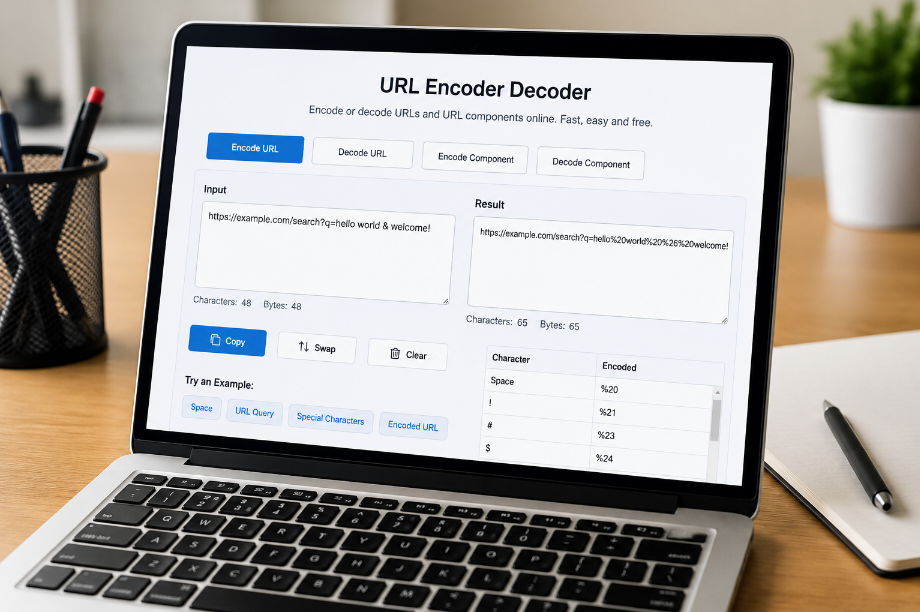
URL Encoder Decoder
| Character | Encoded |
|---|---|
| Space | %20 |
| ! | %21 |
| # | %23 |
| $ | %24 |
| % | %25 |
| & | %26 |
| ' | %27 |
| ( | %28 |
| ) | %29 |
| + | %2B |
| / | %2F |
| : | %3A |
| = | %3D |
| ? | %3F |
URL Encoder & Decoder for Easy URL Encoding and Decoding
Use this free URL Encoder Decoder to encode or decode URLs and URL components online. Quickly convert special characters into URL-safe encoded values or decode encoded text back into a readable format.
What Is a URL Encoder Decoder?
A URL Encoder Decoder is an online utility that helps you work with URLs containing spaces, special characters, symbols, and other characters that may need URL encoding. URL encoding converts characters into a format that can be safely represented inside a URL.
URL decoding performs the opposite operation. It converts percent-encoded values back into their readable form. For example, a space can be represented as %20 in a URL. When decoded, it becomes a normal space again.
Toolstwenty’s URL Encoder Decoder provides separate options for full URL encoding, URL decoding, component encoding, and component decoding, making it useful for everyday web, development, testing, and text-processing tasks.
URL Encoding vs URL Decoding
URL Encode
URL encoding converts characters that need special handling into percent-encoded values. This is useful when preparing text or URL data for use in web addresses.
URL Decode
URL decoding converts encoded URL values back into their readable representation, helping you understand previously encoded text or URL data.
Component Encode
Component encoding is useful when you need to encode a particular part of a URL, such as a value that will be placed inside a URL parameter.
Component Decode
Component decoding converts an encoded URL component back into readable text, making individual parameter values easier to inspect.
Why Use an Online URL Encoder Decoder?
URLs often contain characters that have a special meaning on the web. Spaces and characters such as ?, &, =, # and other symbols may need appropriate encoding depending on where they are used.
An online URL encoding tool can save time when you need to quickly check an encoded value, convert text for URL use, or decode an existing URL without manually replacing percent-encoded characters.
How to Use the URL Encoder Decoder
Add the URL or text you want to process into the tool.
Choose URL Encode, URL Decode, Component Encode, or Component Decode according to your requirement.
The tool processes your input and displays the encoded or decoded result.
Use the Copy option, swap the values, clear the input, or try one of the available examples.
URL Encoding Example
Suppose you have text containing a space and want to represent it in URL-encoded form.
Here, %20 represents a space in percent-encoded URL data. Decoding the encoded value converts it back to the original readable text.
URL Encoder, URL Decoder and Percent Encoding
Percent encoding, also called URL encoding in many practical contexts, represents certain characters using a percent sign followed by hexadecimal digits. This allows characters that have special meanings or are not suitable in a particular URL context to be represented safely.
For example, a space may appear as %20, while an ampersand can be represented as %26. The exact encoding required can depend on the part of the URL where the value is being used.
Who Can Use This URL Encoding Tool?
Web Developers
Quickly encode or decode URL values while working with links, parameters, and web applications.
Students & Learners
Understand URL encoding, decoding, percent encoding, and URL components with simple examples.
Content Creators
Check URL text and convert characters when preparing links or working with web-based content.
Technical Users
Inspect encoded URLs and quickly convert URL data without manually editing percent-encoded values.
Frequently Asked Questions About URL Encoder Decoder
What is a URL Encoder Decoder?
A URL Encoder Decoder is a tool used to encode URLs or URL components into percent-encoded form and decode encoded URL data back into readable text.
How do I encode a URL online?
Enter your URL or text into the Toolstwenty URL Encoder Decoder and select the URL Encode option. The tool will generate the encoded result for you.
How do I decode a URL online?
Paste the encoded URL or text into the tool and select URL Decode. The encoded values will be converted back into their readable representation.
What is URL encoding?
URL encoding is a method of representing certain characters in a URL using percent-encoded values. It helps represent URL data in a suitable format for web use.
What does %20 mean in a URL?
%20 is the percent-encoded representation commonly used for a space in URL data.
What is the difference between URL encoding and URL decoding?
URL encoding converts characters into an encoded URL representation, while URL decoding converts encoded values back into readable characters.
What is percent encoding?
Percent encoding represents characters using a percent sign followed by hexadecimal digits. It is widely used when characters need to be represented safely within URL data.
Can I encode a URL component instead of a complete URL?
Yes. This tool includes Component Encode and Component Decode options for working with individual URL components.
Is URL encoding the same as URL encryption?
No. URL encoding changes how data is represented, while encryption uses cryptographic techniques to protect data. They serve different purposes.
Can I copy the encoded or decoded result?
Yes. The tool includes a Copy option so you can quickly copy the generated result.
Encode or Decode Your URL Online
Need to encode a URL, decode encoded URL text, or work with a specific URL component? Use the Toolstwenty URL Encoder Decoder to process your data quickly and easily.
SEO Tools
Latest Posts
- Bluehost Hosting Review 2026: Pricing, Plans & WordPress Hosting
- 12 Free SEO Tools for Websites & YouTube to Improve Your Content
- Systeme.io Review 2026: Pricing, Free Plan, Features & Sales Funnels
- What Is an Image Resizer? Image Dimensions, Pixels, Size & Resolution Explained
- Backwards Text: How to Write, Reverse & Copy Text Backwards
- Online Diff: The Ultimate Guide to Comparing Two Texts
- How to Remove Line Breaks in Excel, Word & Notepad
- How to Remove Duplicate Lines from Any Text (Guide)
- YouTube Title Ideas That Make Your Videos Easier to Discover
- How to Extract Tags From YouTube Videos: A Complete Guide