
How to Count Words and Characters Online (Complete Guide)
In digital publishing, academic writing, and online marketing, text length determines success. A tweet cut off mid-sentence due to character limits loses its impact. A meta description that exceeds Google’s display width gets truncated with ellipses, lowering your search click-through rate. An academic essay falling short of required word counts risks grade deductions.
Whether you are optimizing blog posts for search engines, formatting ad copy, writing university assignments, or polishing social media content, knowing how to count words and characters online accurately is essential. This guide covers word and character counting techniques, software shortcuts, platform-specific character limits, complex Excel formulas, and methods to structure content to meet strict length requirements.
Why Learning How to Count Words and Characters Online Matters
Word and character counts are structural metrics that influence readability, search engine indexing, user engagement, and compliance with editorial standards.
1. Search Engine Optimization (SEO)
Search engines analyze content depth to determine whether a web page answers user search intent. While Google does not enforce a rigid minimum word count for ranking, comprehensive guides that explore topics thoroughly naturally perform better in competitive niches. Tracking your word count alongside heading structure and keyword placement ensures your article provides sufficient depth without adding unnecessary filler.
2. Social Media & Digital Advertising Limits
Every social media network and ad platform enforces strict character boundaries. Ad networks like Google Ads and Meta Ads reject campaigns if headlines or descriptions exceed allowed character limits by even a single character. Social networks enforce hard character caps that either block publication or clip your message mid-thought.
3. Academic & Professional Compliance
Universities, journal publishers, and professional clients set specific word count ranges. Falling short suggests incomplete research, while exceeding limits violates submission guidelines. Professional editors often charge by word or character count, making precise tracking financially necessary.
4. Readability & Audience Retention
Modern online readers skim text. Monitoring sentence length, paragraph density, and estimated reading time helps you structure content that keeps visitors engaged longer, reducing bounce rates on your website.
Social Media & Digital Marketing Character Limits (2026 Reference)
To prevent messaging cutoff and ad rejections, keep this complete platform reference table nearby when drafting social copy or advertising text.
| Platform / Network | Content Type | Maximum Limit (Hard Cap) | Ideal Length for Highest Engagement |
|---|---|---|---|
| Google Search | Meta Title | ~60 characters (580px) | 50 – 55 characters |
| Google Search | Meta Description | ~160 characters (960px) | 145 – 155 characters |
| Google Ads | Headline / Description | 30 / 90 characters | Use full character allotment |
| X (Twitter) | Standard Post (Free) | 280 characters | 70 – 100 characters |
| X (Twitter) | Premium Long Post | 25,000 characters | 200 – 400 words |
| Organic Feed Post | 63,206 characters | 40 – 80 characters | |
| Post Caption / Bio | 2,200 / 150 characters | 125 – 150 characters | |
| Post / Article / Bio | 3,000 / 100,000 / 220 chars | 100 – 250 words | |
| YouTube | Title / Description / Tag | 100 / 5,000 / 500 characters | Title under 60 characters |
| Title / Description | 100 / 500 characters | 200 – 300 characters | |
| TikTok | Video Caption | 4,000 characters | 150 – 300 characters |
| SMS Messaging | Single SMS Segment | 160 characters | Under 160 characters |
How to Count Words and Characters Online Using Popular Software
Before relying on external web tools, you can track metrics inside standard office suites and cloud document editors.
1. Google Docs (Web & Mobile)
Google Docs provides real-time word counting and on-screen display options.
- Keyboard Shortcut: Press Ctrl + Shift + C on Windows or Cmd + Shift + C on Mac.
- Menu Path: Click Tools in the top navigation bar and select Word count.
- Enable Live On-Screen Counter: Check the box labeled “Display word count while typing” in the Word Count pop-up. A live box will appear in the bottom-left corner of your document.
- Highlight Specific Text: To count words in a single paragraph, highlight the selection before pressing Ctrl + Shift + C.
2. Microsoft Word (Desktop & Web)
Microsoft Word displays text counts automatically in its user interface.
- Status Bar: Look at the bottom-left corner of the Microsoft Word application window. The total word count displays continuously.
- Detailed Statistics Box: Click directly on the word count text in the status bar to open the full statistics window, which displays pages, words, characters (no spaces), characters (with spaces), paragraphs, and lines.
- Keyboard Shortcut: Press Ctrl + Shift + G (Windows) or Cmd + Shift + G (Mac).
3. Microsoft Excel (Using Formulas)
Microsoft Excel does not feature a dedicated “Word Count” button on its ribbon interface. However, you can calculate word counts inside cells using a combination of formulas.
- Count Total Characters in Cell A1: =LEN(A1)
- Count Characters Without Spaces in Cell A1: =LEN(SUBSTITUTE(A1, ” “, “”))
- Count Words in Cell A1: =LEN(TRIM(A1))-LEN(SUBSTITUTE(TRIM(A1),” “,””))+1
Explanation: The TRIM function removes extra spaces at the beginning or end of text. The SUBSTITUTE function temporarily strips all spaces inside the cell. Subtracting the length of text without spaces from the total length gives the total number of spaces, and adding 1 calculates the total word count.
4. Apple Pages (Mac & iPad)
- Click View in the top toolbar.
- Select Show Word Count.
- Click the arrows next to the counter at the bottom of the page to toggle between word count, character count with spaces, character count without spaces, total paragraphs, and total pages.
5. PDF Documents (Adobe Acrobat & Browsers)
PDF readers do not always provide simple word counter buttons because PDFs treat text as rendered layout blocks.
- Method 1: Open the PDF, press Ctrl + A (or Cmd + A) to select all text, copy it, and paste it directly into an online word counter tool.
- Method 2 (Adobe Acrobat Pro): Save or export the PDF file as a Word Document (.docx) or Plain Text file (.txt), then check the file statistics.
Limitations of Built-In Software Word Counters
While desktop word processors handle basic text length tracking well, they lack editing and marketing analytics needed for modern digital publishing.
Standard word processors generally fail to provide:
- Instant Keyword Frequency Analysis: They do not automatically isolate top recurring words or compute single-word and multi-word keyword density percentages.
- Audio & Video Script Timers: They do not offer estimations for speaking times based on industry-standard narration paces.
- Real-Time Web Copy Formatting: Pasting web copy into heavy desktop software takes extra time and distorts original formatting or code tags.
- Instant Browser Accessibility: Web creators need fast, lightweight tools that run directly inside browser tabs without software installation or account logins.
How to Use Toolstwenty Free Online Word Counter
For fast, browser-based text analysis with complete real-time metrics, use the Professional Word Counter. It processes large documents directly inside your web browser without sending content to external servers.
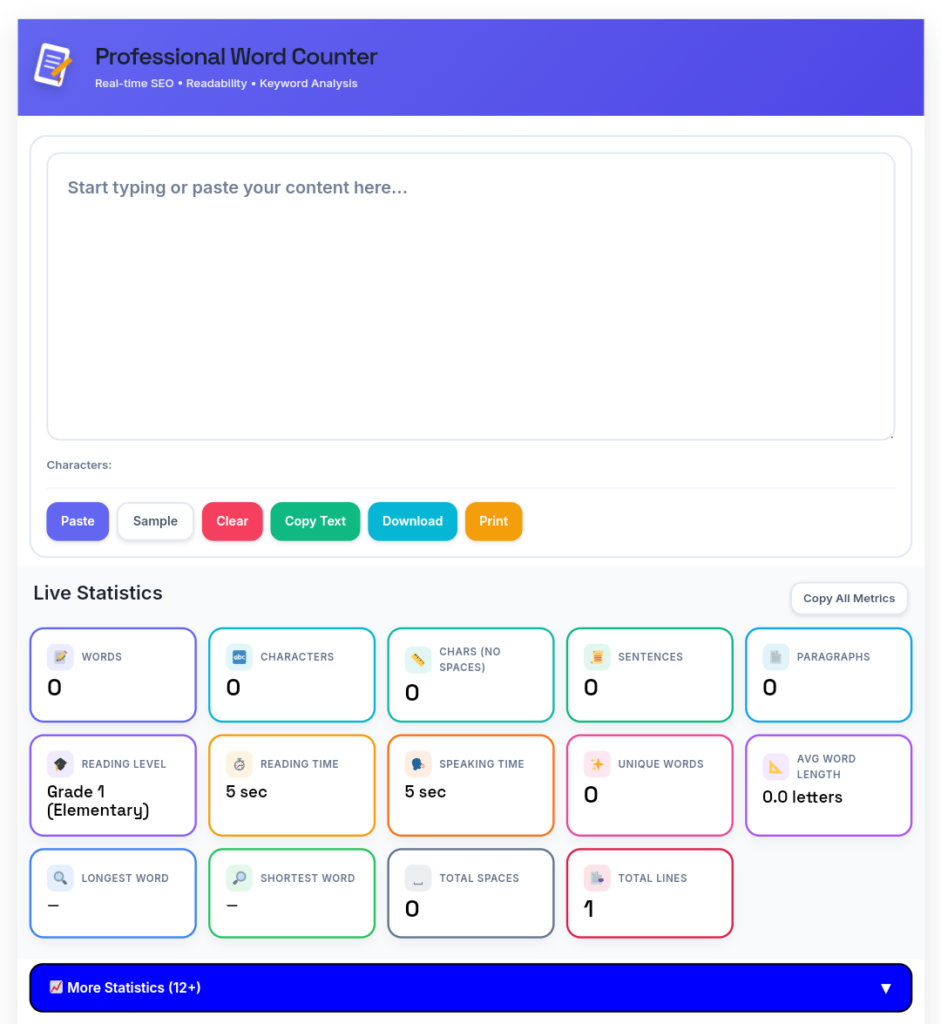
Step 1: Paste or Type Your Copy
Copy your content from your document editor, CMS, or draft notes and paste it directly into the input area. The tool handles short snippets or documents over 10,000 words without lag.
Step 2: Review Core Live Metrics
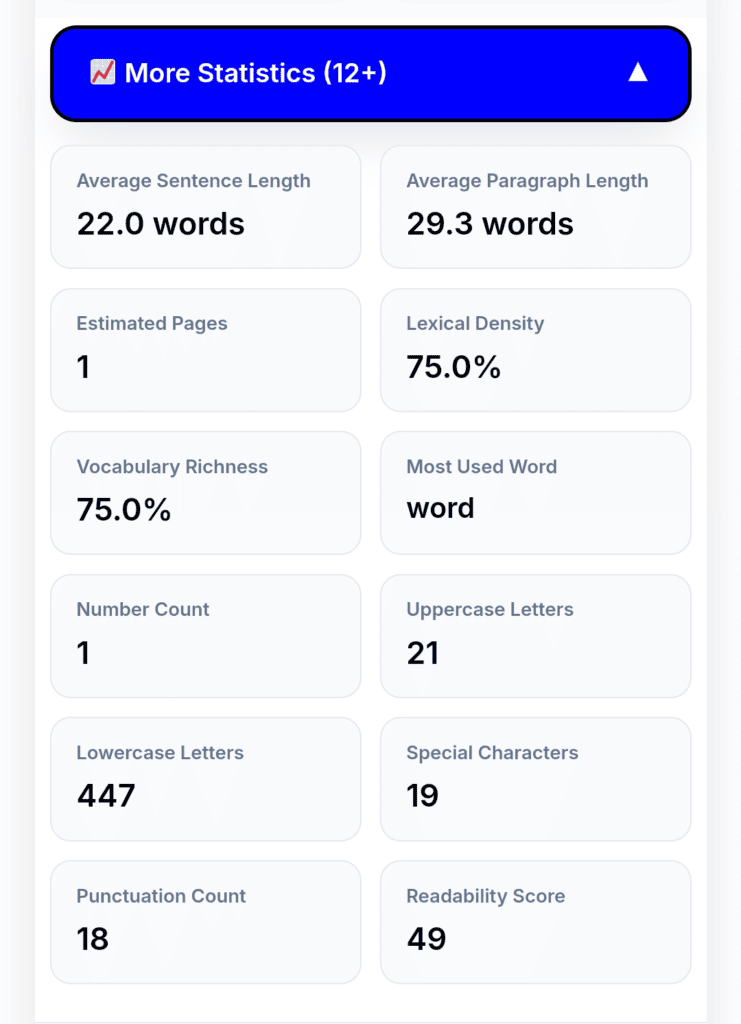
The main statistics panel immediately updates as you type or edit, showing:
- Total Word Count: Primary metric for draft length tracking.
- Characters With & Without Spaces: Dual tracking to meet both social media caps and academic formatting rules.
- Sentence & Paragraph Counts: Helps monitor structural balance and overall document flow.
- Average Sentence Length: Identifies whether writing contains overly complex or run-on sentences.
Step 3: Utilize the Keyword Density Analyzer
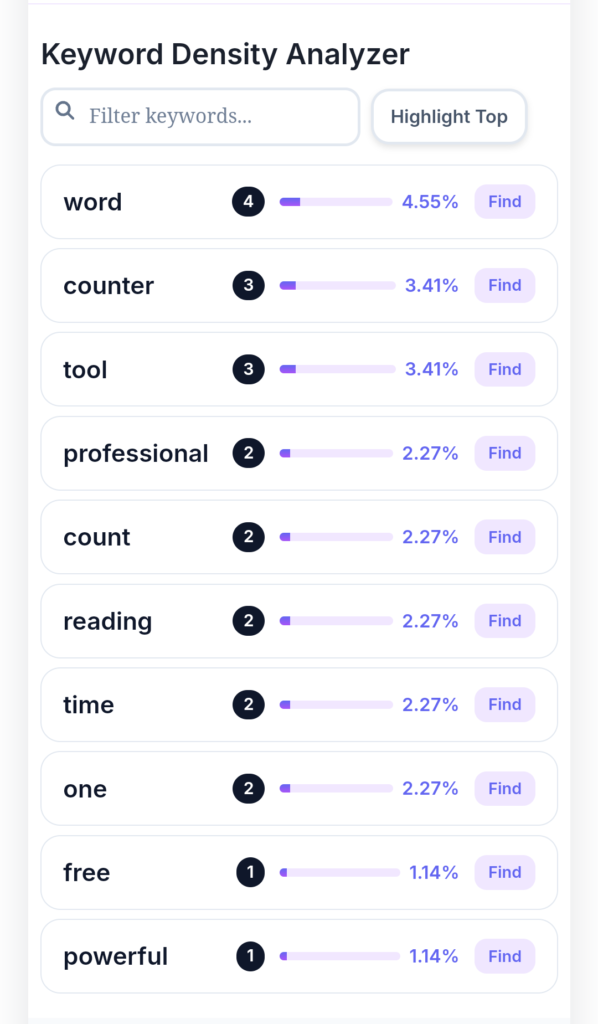
Scroll to the keyword analysis panel to view your top primary terms and their exact density percentages. Use the Highlight/Find feature to locate every instance of a target keyword inside the input editor. This ensures your draft avoids accidental keyword stuffing while maintaining focus on main topic terms.
Step 4: Check Reading and Speaking Paces
Review the estimated Reading Time (calculated at an average adult reading speed of 200 words per minute) and Speaking Time (calculated at a speech narration pace of 130 words per minute). This helps podcast hosts, video creators, and public speakers time their scripts accurately before recording.
Key Writing Metrics and How to Calculate Them
To refine your drafts beyond simple length checks, monitor these foundational writing metrics.
———————————————————————————+
| CONTENT METRICS BREAKDOWN SHEET |
+———————————————————————————+
| Metric | Target / Standard Range | Practical Use Case |
+————————–+————————–+—————————+
| Primary Keyword Density | 1.0% to 2.0% | SEO Content Optimization |
| Average Sentence Length | 15 to 20 words | Readability & Flow |
| Average Paragraph Length | 3 to 4 sentences | Skimmability & UX |
| Silent Reading Speed | ~200 words per minute | Blog Estimated Read Time |
| Speech Narration Speed | ~130 words per minute | Scripts, Ads & Podcasts |
+———————————————————————————+
Characters With vs. Without Spaces
- Characters With Spaces: Includes letters, numbers, punctuation marks, symbols, and blank space bar inputs. This metric applies to social media character caps, ad title rules, and SMS length limits.
- Characters Without Spaces: Measures only alphanumeric characters, symbols, and punctuation marks. Academic institutions, professional translation agencies, and publishing houses often base billing or guidelines on character counts without spaces.
Average Sentence & Paragraph Length
Short sentences improve clarity and comprehension. Aim for an average sentence length of 15 to 20 words. If your draft averages over 25 words per sentence, break up complex clauses into shorter sentences. Keep paragraphs between 3 to 4 lines on desktop, which translates to easy-to-read chunks on mobile screens.
How Word Count Translates to Printed Pages
A common question among students and authors is how online word counts convert to printed manuscript pages. Page counts vary based on font type, font size, line spacing, paragraph breaks, and margin settings.
Here is an industry-standard benchmark assuming standard 12-point font (Times New Roman or Arial) with 1-inch margins:
- 250 Words: ~1 page double-spaced | ~0.5 pages single-spaced
- 500 Words: ~2 pages double-spaced | ~1 page single-spaced
- 1,000 Words: ~4 pages double-spaced | ~2 pages single-spaced
- 2,500 Words: ~10 pages double-spaced | ~5 pages single-spaced
- 5,000 Words: ~20 pages double-spaced | ~10 pages single-spaced
- 10,000 Words: ~40 pages double-spaced | ~20 pages single-spaced
For precise custom conversions based on spacing choices, use our dedicated Words Per Page Calculator.
How to Expand or Reduce Content Length Efficiently
Hitting exact word count targets often requires expanding short drafts or trimming wordy manuscripts. Here are practical ways to edit text without compromising quality.
How to Safely Expand Short Content (Without Adding Fluff)
- Add Real-World Examples: Illustrate abstract points with concrete case studies or step-by-step examples.
- Address Unanswered Follow-Up Questions: Anticiapte questions a reader might ask after reading a section and provide clear answers.
- Include Supporting Data or Quotes: Reference research studies, industry statistics, or expert quotes to back up claims.
- Clarify Industry Jargon: Define technical terms or acronyms for broader audience understanding.
How to Trim Wordy Content (Without Losing Meaning)
Use Bulleted Lists for Complex Series: Convert long, comma-separated lists into clean bulleted points.
Eliminate Passive Voice: Convert passive sentences into active ones. (e.g., Change “The document was reviewed by the editor” to “The editor reviewed the document”).
Remove Redundant Phrases: Replace bloated phrases with concise single words:
Replace “in order to” with “to”.
Replace “due to the fact that” with “because”.
Replace “at this point in time” with “now”.
Replace “a large number of” with “many”.
Cut Filler Modifiers: Remove weak adverbs and adjectives like “very”, “really”, “basically”, “essentially”, and “currently”.
Use Bulleted Lists for Complex Series: Convert long, comma-separated lists into clean bulleted points.
Frequently Asked Questions (FAQ)
Do spaces count as characters in an online character counter?
Yes. By default, online character counters show two metrics: Characters with spaces and Characters without spaces. Social media networks (X, Facebook, Instagram, LinkedIn) and ad platforms (Google Ads) count spaces toward their official character limits. Academic papers and translation assignments often exclude spaces.
What is the ideal word count for an SEO blog post?
There is no single mandatory word count for ranking on Google. However, top-performing informational guides typically range between 1,200 and 2,500 words because longer posts cover subtopics more thoroughly. Focus on answering user intent completely rather than adding artificial filler to meet a target length.
How do I check word counts in a scanned PDF file?
Scanned PDF files contain image data rather than selectable text. To count words in a scanned document, run an Optical Character Recognition (OCR) tool to convert the PDF into editable text, or copy-paste the text output into an online word counter.
How many words are in a 5-minute speech?
An average speaker delivers around 130 to 150 words per minute. Therefore, a 5-minute speech script should contain approximately 650 to 750 words.
Why do different word counting tools show slightly different results?
Different counting algorithms handle hyphenated words, symbols, numbers, and contractions differently. For example, some tools count a hyphenated phrase like “state-of-the-art” as one single word, while others count it as three separate words.
Latest Posts
- Bluehost Hosting Review 2026: Pricing, Plans & WordPress Hosting
- 12 Free SEO Tools for Websites & YouTube to Improve Your Content
- Systeme.io Review 2026: Pricing, Free Plan, Features & Sales Funnels
- What Is an Image Resizer? Image Dimensions, Pixels, Size & Resolution Explained
- Backwards Text: How to Write, Reverse & Copy Text Backwards
- Online Diff: The Ultimate Guide to Comparing Two Texts
- How to Remove Line Breaks in Excel, Word & Notepad
- How to Remove Duplicate Lines from Any Text (Guide)
- YouTube Title Ideas That Make Your Videos Easier to Discover
- How to Extract Tags From YouTube Videos: A Complete Guide