
How to Find Keywords for SEO Free: Step-by-Step Guide

If you want your website or blog to appear in search results without paying hundreds of dollars for SEO software, learning how to find keywords for SEO should be one of your priorities. Keywords help search engines understand what your page is about and what potential visitors are looking for.
Most new bloggers assume that they need to invest in a paid SEO subscription and use fancy keyword databases to get better results. In reality, you can find plenty of great search terms directly from Google and other search engines.
In this article, you will learn how to find keywords for SEO using Google Autocomplete, People Also Ask, related searches, competitor research, long-tail keyword research, and free keyword suggestion tools. We will also cover keyword organization and prioritization.

Why Free Keyword Research Works
Keyword research has changed over the years, but the basic idea remains the same: learn what people are looking for and create content that satisfies their needs.
Most paid SEO tools offer valuable insights such as search volume, keyword difficulty, backlinks, and competitor analysis. However, you do not need to subscribe to a paid service to find great topics for your articles. Search engines provide a lot of information about what people are searching for right now.
If you know how to find keywords for SEO, you can use information directly from Google to create a list of potential topics.
Here are some of the benefits of using free keyword research methods:
- No subscription fee: You can do keyword research without spending money on a search marketing subscription.
- Real-time search ideas: You can discover what people are searching for and find fresh topic ideas.
- More long-tail keywords: Free keyword research methods often suggest more specific search terms.
- Better understanding of search intent: You will have a better idea of what people are looking for based on the wording of their search queries.
- Easy to repeat: You can use the same process for every new article.
The point of keyword research is not to collect hundreds of search terms. Instead, you should focus on finding relevant keywords and creating valuable content around them.
Step-by-Step Guide
Finding useful keywords should not be a difficult task. In fact, you can use a simple process to collect relevant search terms and turn them into blog posts, articles, or web pages.
Let’s start with a brief overview of the process:
- Start with a seed keyword.
- Use Google Autocomplete.
- Look at People Also Ask.
- Check Related Searches.
- Use the Alphabet Soup method.
- Analyze competitor content.
- Organize your keywords.
- Prioritize your keywords.
- Write an article that answers users’ questions and provides more information than existing resources.
The entire process is relatively simple and can be completed in less than an hour. Now, let’s take a closer look at each step and discuss how to find keywords for SEO using free methods.
1. Start With a Seed Keyword
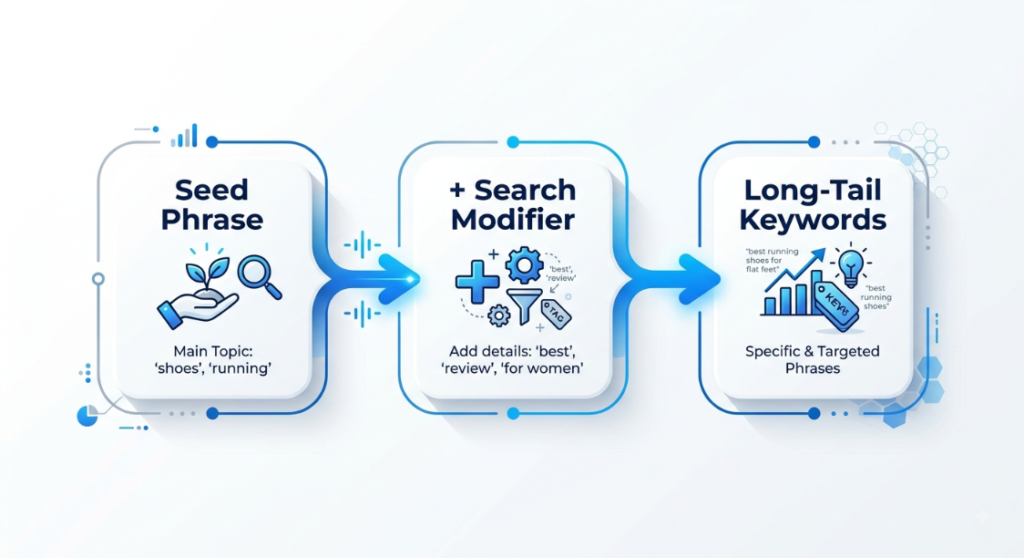
The first step is to think of a general keyword or topic related to your website, product, or blog. This is also referred to as a seed keyword.
For example, if your blog is about SEO, your seed keywords might include:
- SEO tools
- keyword research
- SEO keywords
- free keyword tools
- Google keyword research
- long-tail keywords
Do not worry about finding the best keywords at this stage. Your seed keywords are simply the starting point, and you will turn them into more specific search terms using the methods below.
2. Use Google Autocomplete
One of the easiest ways to find new keywords is to use Google Autocomplete. Simply type your seed keyword into Google Search, and you will see suggested search terms below the search bar.
For example, if your seed keyword is keyword research, you may see suggestions such as:
- keyword research for beginners
- keyword research tools
- keyword research for SEO
- keyword research free
You can also try adding different words at the beginning or end of your seed keyword to get more search terms. For example, you can type:
- how to find keywords…
- best way to find keywords…
- free keyword research…
- keyword research for…
Using Google Autocomplete, you can get dozens or even hundreds of search ideas without spending any money.
Use Our Free Google Keyword Suggestion Tool
Manually typing keywords into Google can be time-consuming, especially if you have dozens of seed keywords. Our Google keyword suggestion tool helps you collect search terms suggested by Google more efficiently.
Instead of typing every variation into Google, you can enter a keyword and collect suggested search terms from Google, Bing, or other supported search engines. Depending on the tool’s available features, you can also use the Alphabet Soup method to find additional search terms and long-tail keywords.
This can greatly speed up the initial keyword research process.
3. Look at People Also Ask
Google’s People Also Ask section is another great source of information and potential keyword ideas. Simply search for your main topic on Google and look for the questions that appear in the People Also Ask section.
When looking at People Also Ask, focus on the questions rather than the answers. For example, if you search for keyword research, you may find questions such as:
- What is keyword research?
- How do beginners find keywords?
- What are long-tail keywords?
- How do I find keywords without a tool?
- What is the best free keyword research method?
You can use these questions as ideas for your articles. You do not need to create a separate article for each question. Instead, you can combine similar questions and create a comprehensive guide.
4. Check Related Searches
After completing a Google search, scroll down to the bottom of the search results. You may see a section called Related Searches. Take a look at the suggested search terms to discover additional ideas.
For example, if you search for SEO keyword research, you may find related searches such as:
- free SEO keyword tools
- keyword research examples
- how to choose keywords
- SEO keyword ideas
- keyword research for blogs
Related searches can help you find additional topics and keywords. They can also suggest alternative ways of searching for the same topic.
5. Use the Alphabet Soup Method
The Alphabet Soup method is a variation of Google Autocomplete. Take your seed keyword and add letters from A to Z after it.
For example:
- keyword research a…
- keyword research b…
- keyword research c…
You can continue until you reach the end of the alphabet and collect the useful search terms suggested by Google.
You can also try adding words or letters before the keyword:
- a keyword research…
- best keyword research…
- free keyword research…
Depending on the keyword, the results can be different. You can also use this method alongside People Also Ask and Related Searches to discover more ideas.
6. Analyze Competitor Content
Competitor research is one of the most important parts of SEO. Fortunately, you do not need expensive tools to conduct basic competitor analysis.
Simply type your main keyword into Google and look at the first few relevant results. Visit the websites and take a look at the following elements:
- Page title
- H2 and H3 headings
- Questions and topics covered by the article
- Similar topics covered by multiple articles
- Keywords and related terms used on the page
- FAQ sections
- Missing or incomplete information
For example, if you search for keyword research and visit three similar websites, you may notice that they all cover long-tail keywords, search intent, and keyword difficulty. This suggests that these topics are relevant to the main search query and may be worth covering in your own article.
However, simply copying your competitors will not get you good results. Instead, use their content as inspiration and create a more useful, accurate, and comprehensive guide.
How to Choose SEO Keywords That Are Easier to Rank For
Now that you know how to find keywords for SEO, it is time to learn how to prioritize them. Not every keyword is worth pursuing, especially if you are a new blogger or business owner.
Use the following tips to find keywords that are worth targeting.
1. Look for Long-Tail Keywords
Long-tail keywords are usually more specific and can sometimes be easier to rank for than broad keywords.
For example, a long-tail keyword might be how to find keywords for SEO free, whereas a broad keyword would be SEO keywords.
Broad keywords often have high competition and may not clearly define the user’s intent. In other words, someone searching for SEO keywords may be looking for a general overview. However, someone searching for how to find keywords for SEO free is looking for specific instructions.
As a new blogger, it can be a good idea to start with relevant long-tail keywords because they often have clearer search intent and may have less competition.
2. Focus on Search Intent
Every search query has a purpose. In other words, every keyword reflects the intent of the person searching for it. Before adding a keyword to your list, make sure it matches the intent of your article.
There are four common types of search intent:
- Informational: The person is looking for information or answers. Most blog posts and guides fall under this category. Examples: How does keyword research work? How do I find SEO keywords? What are long-tail keywords?
- Commercial investigation: The person is looking for reviews, comparisons, or information before buying a product or service. Examples: best free keyword research tools, keyword tool comparison, best SEO tools for beginners.
- Transactional: The person is ready to take an action, such as making a purchase or signing up for a service. Examples: buy SEO software, keyword research tool pricing, free keyword generator.
- Navigational: The person is looking for a specific website, page, or brand. Examples: Google Keyword Planner, Google Search Console.
When creating informational content, focus on keywords that match the purpose of your page. Do not automatically avoid transactional or commercial keywords; instead, make sure your content format matches the search intent.
3. Prioritize Relevance Over Search Volume
When it comes to keywords, many bloggers and website owners make the mistake of prioritizing search volume. In other words, they go after keywords with thousands or even millions of searches per month.
However, it is often more important to focus on relevance. A keyword with a lower search volume can bring better results if it is relevant to your niche and target audience.
For example, if you have an SEO blog, a keyword related to cooking may receive a lot of searches, but it is unlikely to bring relevant visitors to your website. At the same time, a keyword with lower search volume but strong relevance to SEO can attract a much more valuable audience.
A useful way to think about keyword selection is:
Relevance → Search intent → Competition → Potential traffic
4. Group Your Keywords
When you have a list of potential keywords, it is a good idea to group them based on their search intent and topic.
For example, these keywords can potentially be grouped under one topic:
- how to find keywords
- how to find keywords for SEO
- how to find SEO keywords
- free keyword research
- find keywords for a website
Depending on the search intent and the topic, you may be able to create one comprehensive guide instead of dozens of short blog posts.
This can help you cover multiple related queries with a single useful resource instead of creating several pages that provide almost identical information.
5. Look for Question-Based Keywords
Many people use question-based search queries to find answers. Here are some common question formats:
- How can I…?
- What is…?
- Why does…?
- Where can I…?
- Can I…?
- Which is…?
- How do I…?
For example, question-based keywords include:
- How do I find keywords for my website?
- Can I find SEO keywords for free?
- What are the best free keyword research methods?
- How do I find long-tail keywords?
You can use these questions as the basis for your articles. In fact, many questions can be turned into blog posts, FAQ sections, or even video content.
Common Keyword Research Mistakes to Avoid
When learning how to find keywords for SEO, you should also know which mistakes to avoid.
Mistake #1: Going After Only High-Volume Keywords
As mentioned above, it can be difficult for a new blogger or business owner to compete for extremely high-volume keywords. These keywords are often highly competitive, and it may take considerable time and effort to rank for them.
Instead, consider targeting relevant keywords with clearer intent and more specific topics.
Mistake #2: Focusing on Keywords With the Wrong Intent
Always make sure that your keywords match the intent of your article. If you create an informational guide but target keywords where users expect a product page, you may struggle to satisfy their expectations.
Before creating content, search the keyword on Google and look at the type of pages that are ranking.
Mistake #3: Keyword Stuffing
You should not stuff keywords into every paragraph just to improve SEO. Excessive repetition can make your content difficult to read and may create a poor experience for visitors.
Use your primary keyword naturally and include related terms only when they make sense within the context.
Mistake #4: Creating a Separate Page for Every Keyword
If you have a list of similar keywords, avoid automatically creating dozens of pages for each variation.
Instead, group keywords with similar intent and determine whether one comprehensive page can answer multiple related searches.
Mistake #5: Forgetting About Existing Pages
When doing keyword research, always remember to look at your existing pages. You may find relevant keywords that you have not covered yet.
You can use these opportunities to improve existing content, add useful sections, answer additional questions, and make your pages more comprehensive.
A Simple Free Keyword Research Process
If you are looking for an easy process, use the following steps every time you need to do keyword research:
- Pick a general keyword or phrase (seed keyword).
- Search it on Google.
- Add the most relevant suggestions to your keyword list.
- Look at People Also Ask and add relevant questions to your list.
- Scroll to the bottom of the search results and look at Related Searches.
- Use the Alphabet Soup method by adding letters A-Z to your keyword.
- Search for a few related pages and analyze their content.
- Group similar keywords together.
- Pick one primary keyword and a few closely related questions or phrases.
- Write an article that answers users’ questions and provides more useful information than the existing resources.
This process is simple enough for beginners but can also be used by experienced bloggers and website owners. In fact, even advanced SEOs can benefit from using free keyword research methods.
Frequently Asked Questions
What is the easiest way to find SEO keywords for free?
Google Autocomplete, People Also Ask, Related Searches, competitor research, and free keyword suggestion tools are some of the easiest methods for finding SEO keywords for free. In most cases, using multiple methods will give you better results than relying on a single source.
Can I find keywords for SEO without using paid tools?
Yes, you can. You do not need to subscribe to paid tools to discover useful keyword ideas. You can use Google Autocomplete, People Also Ask, Related Searches, competitor pages, and other free resources to find valuable search terms.
Is Google Autocomplete useful for keyword research?
Yes, Google Autocomplete can be a great source of inspiration for keyword research. However, you should not treat autocomplete suggestions as reliable search-volume data. They are better used for discovering keyword ideas and search variations.
Are long-tail keywords better for new websites?
Long-tail keywords can be a good choice for new websites because they tend to be more specific and often have clearer search intent. However, competition varies from keyword to keyword, so every phrase should be assessed individually.
How many keywords should I target in one article?
There is no exact number. It is generally better to focus on one main topic and naturally include related questions, phrases, and subtopics. A comprehensive guide can rank for multiple related queries without requiring you to target a specific number of keywords.
Should I use the exact keyword in every heading?
No. You should avoid using the exact keyword in every heading because it can make your content sound repetitive and unnatural. It is better to use your primary keyword where it fits naturally and use variations, questions, and related search terms in other headings.
Can I use free keyword research for a new blog or website?
Yes, you can. Free keyword research methods can help you find topics, understand what people are looking for, and develop a list of relevant keywords.
However, it is important to remember that keyword research is only one part of SEO. You will also need to create useful content, optimize your website’s technical SEO, provide a good user experience, and build authority over time.
Final Thoughts
Learning how to find keywords for SEO does not require you to subscribe to a dozen different keyword research tools. In fact, you can use Google Autocomplete, People Also Ask, Related Searches, competitor research, and free keyword suggestion tools to find valuable search terms.
The most important thing to remember is that keyword research is not about collecting hundreds of keywords. Instead, you should focus on understanding what people are looking for and finding the best way to answer their questions.
Start with a simple seed keyword, expand it into long-tail variations, look at related questions, study your competitors, organize your keywords, and write an article that provides more useful information than existing resources.
If you want to speed up the process of finding keywords, be sure to use our Google keyword suggestion tool. It can help you discover search terms suggested by Google, Bing, and other supported search engines. This way, you can make the keyword research process faster and increase your chances of finding long-tail keywords and valuable topics for your articles.