

How To Extract Keywords from Any Text
We spent several days building this Keyword Extractor Tool and carefully improving it to deliver the most accurate and useful results possible. Our goal was simple—to create a fast, reliable, and easy-to-use tool that helps everyone, from beginners to SEO professionals, extract important keywords in just a few seconds.
In today’s competitive digital world, creating content is no longer enough. If you want your articles, blogs, product pages, and websites to rank higher in search engines, you need to understand which keywords are actually present in your content. This is where an Advanced Keyword Extractor Tool becomes incredibly useful.
Whether you’re a blogger trying to improve organic traffic, an SEO professional conducting competitor research, a marketer optimizing content, or a student analyzing large text documents, a reliable keyword extraction online tool can save hours of manual work.
The Advanced Keyword Extractor Tool is a powerful, browser-based solution that helps users instantly extract keywords, phrases, and important terms from any text or webpage URL. Unlike traditional keyword counters, this tool goes beyond basic word counting by identifying meaningful keywords, long-tail phrases, and keyword density metrics that help improve content optimization strategies.
Best of all, it’s completely free, requires no signup, and works directly in your browser without sending your data to external servers.
What Is a Keyword Extractor Tool?
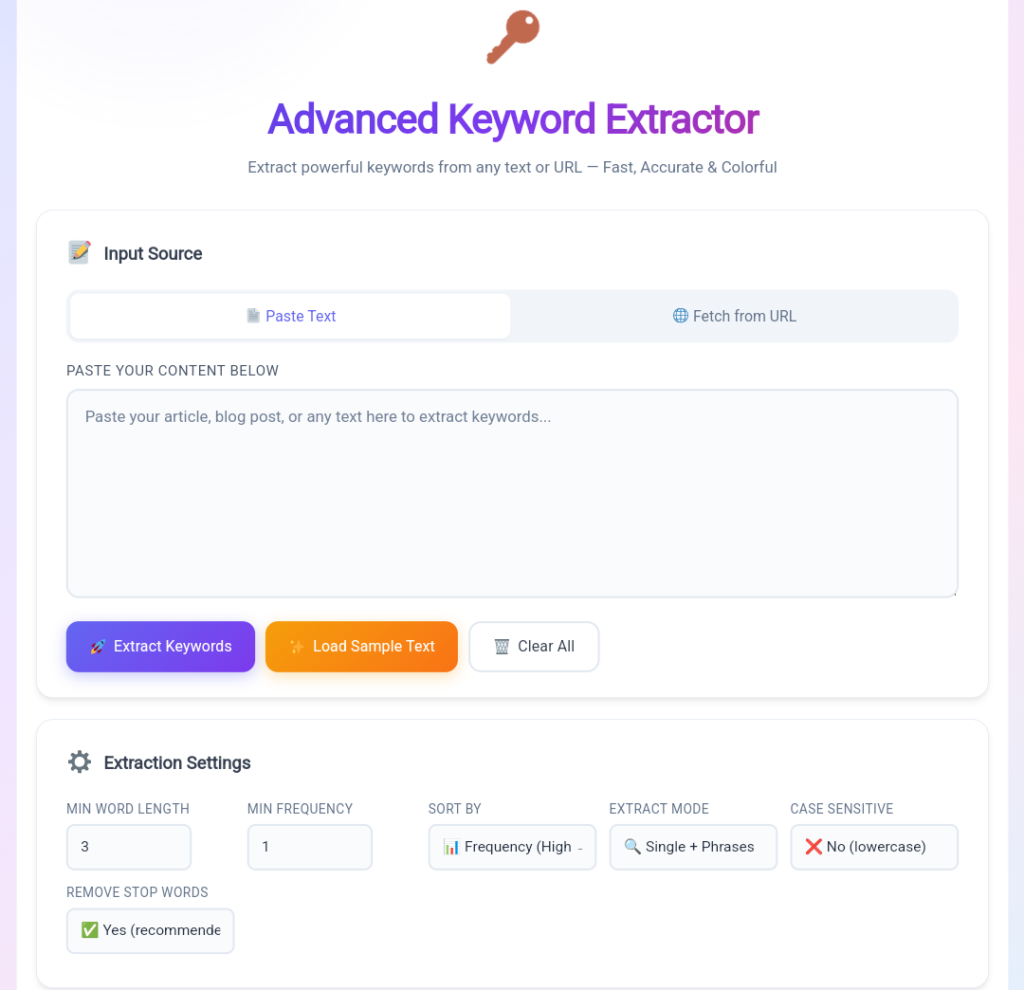
A keyword extractor tool is a specialized utility designed to identify the most important words and phrases within a piece of content. It analyzes text, removes common filler words (known as stop words), and highlights terms that appear most frequently.
These extracted keywords can help you:
- Improve SEO optimization
- Understand content themes
- Discover keyword opportunities
- Analyze competitor content
- Create content briefs
- Perform academic text analysis
- Improve keyword density
For website owners and bloggers, using a free keyword extractor tool is one of the easiest ways to identify ranking opportunities and improve content relevance.
Why Keyword Extraction Matters for SEO
Search engines use keywords to understand what a page is about. When your content naturally contains relevant terms and phrases, search engines can better categorize and rank it.
Keyword extraction helps you:
Identify Important Topics
The tool reveals the most frequently occurring terms in your content, helping you understand what topics dominate the page.
Improve Keyword Density
Overusing keywords can trigger spam signals, while underusing them may weaken relevance. A keyword density checker helps maintain balance.
Discover Long-Tail Keywords
Long-tail phrases often have lower competition and higher conversion rates. Extracting phrases can uncover hidden ranking opportunities.
Analyze Competitors
You can paste competitor articles and instantly see which keywords they emphasize.
Create Better Content Strategies
Keyword data helps content creators build articles around terms that matter most to their audience.
What Makes This Advanced Keyword Extractor Different?
Many keyword tools simply count words.
This advanced solution provides a much deeper analysis.
Key Advantages
- Extract keywords from text instantly
- Extract keywords from webpage URLs
- Analyze single words, bigrams, and trigrams
- Built-in stop word removal
- Frequency and density calculations
- Interactive keyword cloud
- CSV and JSON export options
- Privacy-friendly browser processing
- No registration required
- Completely free to use
If you’re looking for the best free keyword tool for bloggers, these features make it an excellent choice.
Powerful Features of the Advanced Keyword Extractor Tool
1. Dual Input Options
The tool supports two flexible methods of input.
Paste Text Manually
Simply copy and paste:
- Blog posts
- Articles
- Product descriptions
- Research papers
- Social media content
- Website content
The tool instantly analyzes the text and generates keyword reports.
Extract Keywords from URL
Instead of copying content manually, users can enter a webpage URL.
The tool automatically:
- Fetches webpage content
- Removes HTML tags
- Strips scripts and styles
- Cleans formatting
- Extracts readable text
This feature makes the tool an excellent keyword extractor from URL solution.
2. Multiple Extraction Modes
Not all keyword research needs are the same.
That’s why the tool offers several extraction options.
Single Words
Ideal for:
- Basic keyword research
- SEO audits
- Content analysis
Example:
- SEO
- Marketing
- Content
- Blogging
Bigrams (2-Word Phrases)
Perfect for discovering long-tail keywords.
Examples:
- keyword research
- content marketing
- search engine
Trigrams (3-Word Phrases)
Great for topic clustering and semantic SEO.
Examples:
- keyword extraction tool
- search engine optimization
- free keyword tool
All Combined Mode
Displays words, bigrams, and trigrams together for complete analysis.
This makes it a powerful n-gram keyword extractor.
3. Minimum Word Length Filter
Many short words contribute little value to keyword analysis.
With this feature, users can specify the minimum number of characters a keyword must contain.
Examples:
- Length 3
- Length 4
- Length 5+
This helps remove clutter and improve result quality.
4. Minimum Frequency Control
Sometimes words appearing only once are not useful.
The minimum frequency option allows users to display only keywords that appear multiple times.
Benefits include:
- Cleaner reports
- Better keyword relevance
- Easier trend identification
5. Case Sensitivity Options
Users can choose whether uppercase and lowercase words should be treated separately.
Example:
Case Sensitive ON:
- SEO
- seo
Displayed separately.
Case Sensitive OFF:
- SEO + seo
Combined into one keyword count.
Most SEO professionals prefer case-insensitive analysis.
6. Intelligent Stop Word Removal
One of the most valuable features is automatic stop-word filtering.
Common words such as:
- the
- is
- and
- with
- in
are automatically removed.
Hindi stop words are also supported, including:
- और
- में
- है
- का
- के
This allows the tool to focus only on meaningful keywords.
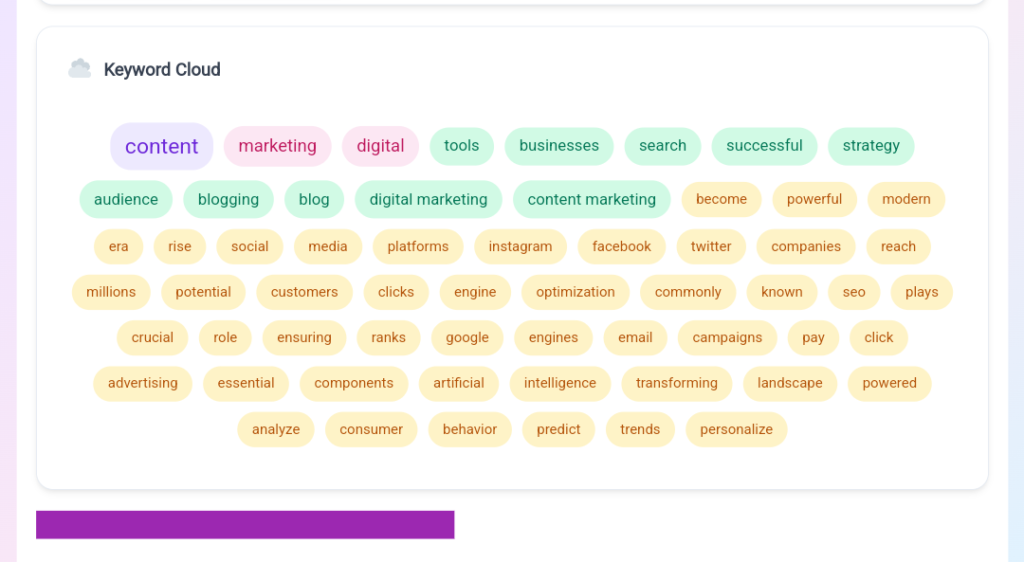
7. Visual Keyword Cloud
Data is easier to understand when presented visually.
The interactive keyword cloud highlights:
- Popular keywords in larger sizes
- Less frequent keywords in smaller sizes
Benefits include:
- Quick trend discovery
- Visual content analysis
- Better keyword prioritization
8. Sortable Keyword Results Table
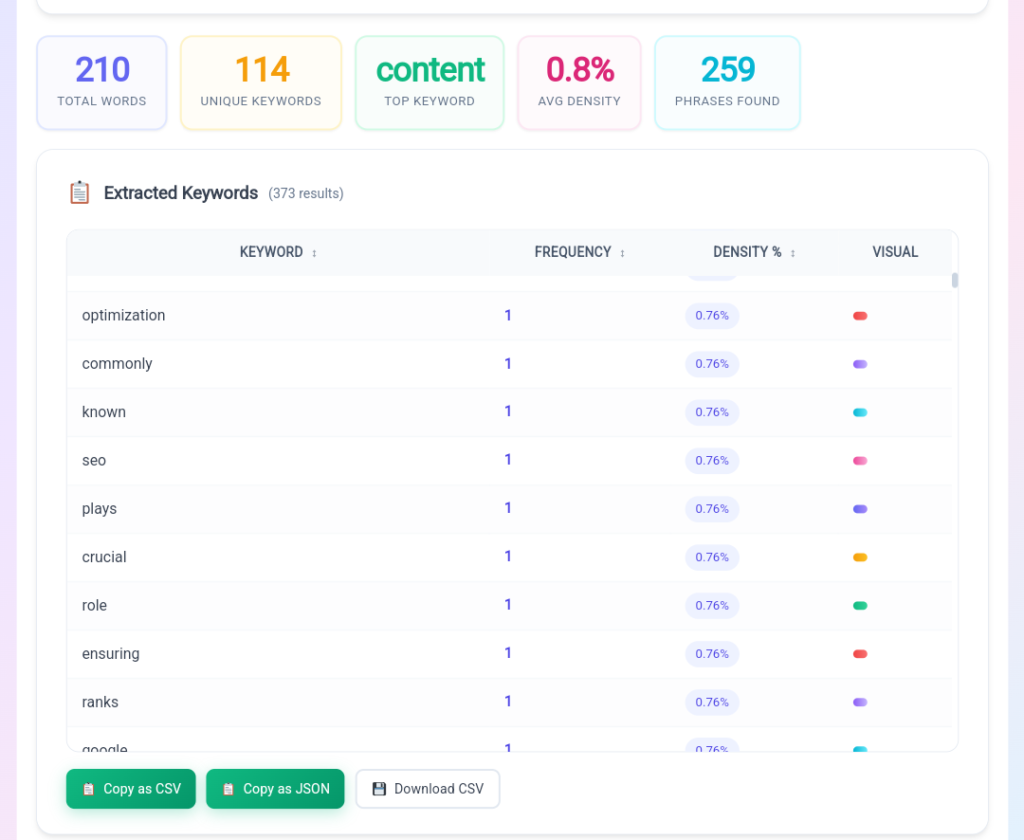
The results table displays:
| Metric | Description |
|---|---|
| Keyword | Extracted word or phrase |
| Frequency | Number of occurrences |
| Density | Percentage of total content |
| Visual Bar | Quick comparison |
Users can sort by:
- Frequency
- Alphabetical order
- Density percentage
9. Export Options
The tool supports multiple export formats.
Copy as CSV
Perfect for:
- Excel
- Google Sheets
- SEO reporting
Copy as JSON
Ideal for:
- Developers
- APIs
- Data processing
Download CSV
Save reports directly to your computer for future analysis.
How to Extract keywords And Step-by-Step Guide: How to Use
Step 1: Select Input Method
Choose either:
- Paste Text
- Fetch from URL
Enter your content source.
Step 2: Configure Settings
Customize:
- Minimum word length
- Minimum frequency
- Sorting preference
- Extraction mode
- Case sensitivity
- Stop word removal
Step 3: Start Extraction
Click the Extract Keywords button.
The tool processes content instantly.
Step 4: Review Results
Analyze:
- Total words
- Unique keywords
- Top keyword
- Average density
- Phrase count
Use the keyword cloud and table for deeper insights.
Step 5: Export Data
Choose:
- CSV
- JSON
- Download file
Save your keyword research for later use.
Who Should Use This Tool?
Bloggers
Find important keywords and improve article SEO.
SEO Professionals
Perform content audits and competitor research.
Content Marketers
Create data-driven content strategies.
Students & Researchers
Analyze academic papers and documents.
Website Owners
Improve search engine visibility and rankings.
Digital Agencies
Generate keyword reports for clients quickly.
Benefits of Using a Free Keyword Extraction Tool
Using an advanced keyword extractor offers several advantages:
- Faster keyword research
- Improved content optimization
- Better SEO decisions
- Stronger topic relevance
- Enhanced competitor analysis
- Easy keyword density monitoring
- Better content planning
Most importantly, it helps users make informed SEO decisions based on real content data.
Final Thoughts
The Advanced Keyword Extractor Tool is much more than a simple word counter. It is a complete keyword analysis platform that helps bloggers, SEO specialists, marketers, students, and website owners discover valuable keywords hidden within their content.
With support for keyword extraction from text and URLs, advanced phrase detection, stop-word filtering, keyword density analysis, visual keyword clouds, and export functionality, it provides everything needed for efficient content analysis.
If you’re searching for a reliable free keyword extractor tool, keyword extraction online solution, SEO keyword finder, or content keyword extractor, this tool delivers powerful features while remaining fast, private, and completely free.
Frequently Asked Questions (FAQs)
1. Is the Advanced Keyword Extractor Tool completely free?
Yes. The tool is 100% free to use with no registration, subscriptions, or hidden charges.
2. Can I extract keywords from a webpage URL?
Yes. Simply enter a publicly accessible webpage URL and the tool will fetch and analyze its content automatically.
3. Does the tool support long-tail keyword extraction?
Absolutely. It can extract both two-word phrases (bigrams) and three-word phrases (trigrams), making it ideal for long-tail keyword research.
4. Can I use this tool for competitor SEO analysis?
Yes. You can analyze competitor content by pasting article text or fetching their webpage URLs.
5. Does the tool calculate keyword density?
Yes. Each keyword includes a density percentage, helping you understand content optimization levels.
6. Which languages are supported?
The tool supports Unicode text, making it compatible with English, Hindi, Marathi, Spanish, French, German, and many other languages.
7. Why does URL extraction sometimes fail?
Some websites block external requests through CORS restrictions. In such cases, manually copy the page content and paste it into the tool.
8. Can I export my keyword reports?
Yes. You can copy results as CSV or JSON and also download CSV files directly to your device.