
What Is a Slug in SEO, WordPress & Digital Marketing?
When you create a website, publish a blog post, or manage an online store, you will often come across the term slug. But what is a slug, and why does it matter when creating a website URL?
A slug is the readable part of a URL that usually identifies a specific page or post. A good slug is short, descriptive, easy to read, and relevant to the page content. Instead of leaving a URL with unnecessary characters or a complicated structure, you can use a clear slug that helps people understand what a page is about. For example, if your title is “Top 10 SEO Tips for Beginners in 2026!”, a clean slug could be:
top-10-seo-tips-for-beginners-in-2026
This is the type of URL structure most website owners prefer because it is simple, descriptive, and easy to share. If you frequently create URLs from titles, a URL Slug Generator can make this process much faster. Instead of manually removing spaces, special characters, and unnecessary formatting, you can enter your text and generate a URL-friendly slug in seconds.
What Is a Slug and Why Does It Matter?
If you are building a WordPress website or publishing content online, you may wonder, what is a slug exactly?
In simple terms, a slug is the part of a URL that identifies a particular page or post in a readable format. For example, in:
https://example.com/seo-tips
the slug is generally: seo-tips
A descriptive slug makes a URL easier for people to understand before they visit the page. It can also provide useful context about the page topic to search engines. A slug is only one part of a complete URL. Depending on the website structure, a URL may also contain a domain name, category or directory path, query parameters, and other components. For this reason, a good slug should normally be short, descriptive, and closely related to the content of the page.
What Is a URL Slug Generator?
A URL Slug Generator is an online tool that transforms normal text into a URL-friendly slug. It can convert titles, phrases, or other text into a cleaner format by changing letters to lowercase, replacing spaces with hyphens, and removing unnecessary special characters.
For example:
Original Text: How to Improve Website Speed in 2026
Generated Slug: how-to-improve-website-speed-in-2026 Instead of manually formatting every URL, you can paste your text into a Text to Slug Converter and generate a usable slug within seconds. This can be particularly useful for bloggers, content creators, SEO professionals, marketers, developers, and website owners who create URLs regularly.
Understanding What Is a Slug in SEO, WordPress, and Website Design
If you are new to web publishing, understanding what is a slug can help you create clearer and more organized URLs.
What Is a Slug in SEO?
In search engine optimization, a slug is the descriptive portion of a URL that identifies a specific page or post. Words used in a URL can provide useful context about the page, especially when the URL clearly describes its subject. However, a slug should not be created only for search engines. It should also be easy for people to read and understand.
For example:
example.com/seo-tips-for-beginners
is much easier to understand than:
example.com/page?id=4527
A descriptive URL gives users an immediate idea of what they may find on the page.
What Is a Slug in WordPress?
If you use WordPress, you may also ask, what
is a slug in WordPress?
When you create a post or page, WordPress can automatically generate a slug based on the title. You can edit that slug when necessary to make it shorter, clearer, or more descriptive. For example, a post titled:
How to Improve Website Speed for Beginners
could use the slug:
how-to-improve-website-speed
Keeping the slug concise can make the resulting URL easier to read and share.
What Is a Slug in a Website?
Across general website design and architecture, a slug is the readable portion used to identify a particular page.
For example:
example.com/blog/clean-url-guide
Here, clean-url-guide is the page slug.
A descriptive slug can make individual URLs easier to understand and can help maintain a consistent naming style across a website.
Why Is a Slug in Content Writing and Digital Marketing Important?
Creating clear URLs helps writers accurately represent their content.
What Is a Slug in Content Writing?
For content writers, a slug is usually created from the main topic or title of an article. A concise slug allows readers to understand the subject of a page by looking at its URL.
For example:
how-to-write-better-blog-posts
is more descriptive than:
post12345
The first URL gives the reader useful information about the page before clicking it.
What Is a Slug in Digital Marketing?
In digital marketing, slugs are commonly used for blog posts, landing pages, product pages, guides, and other online resources.
A short and descriptive slug can make links easier to read, remember, copy, and share. Marketers should still use proper campaign tracking methods, such as appropriate tracking parameters, when they need detailed campaign measurement. A poorly structured URL can look confusing, while a descriptive URL gives users clearer information about the destination. Compare these two examples:
Poor URL: example.com/post?id=4527&cat=seo
Better URL: example.com/how-to-improve-website-speed
The second version immediately communicates the general subject of the page.
How Does the URL Slug Generator Work?
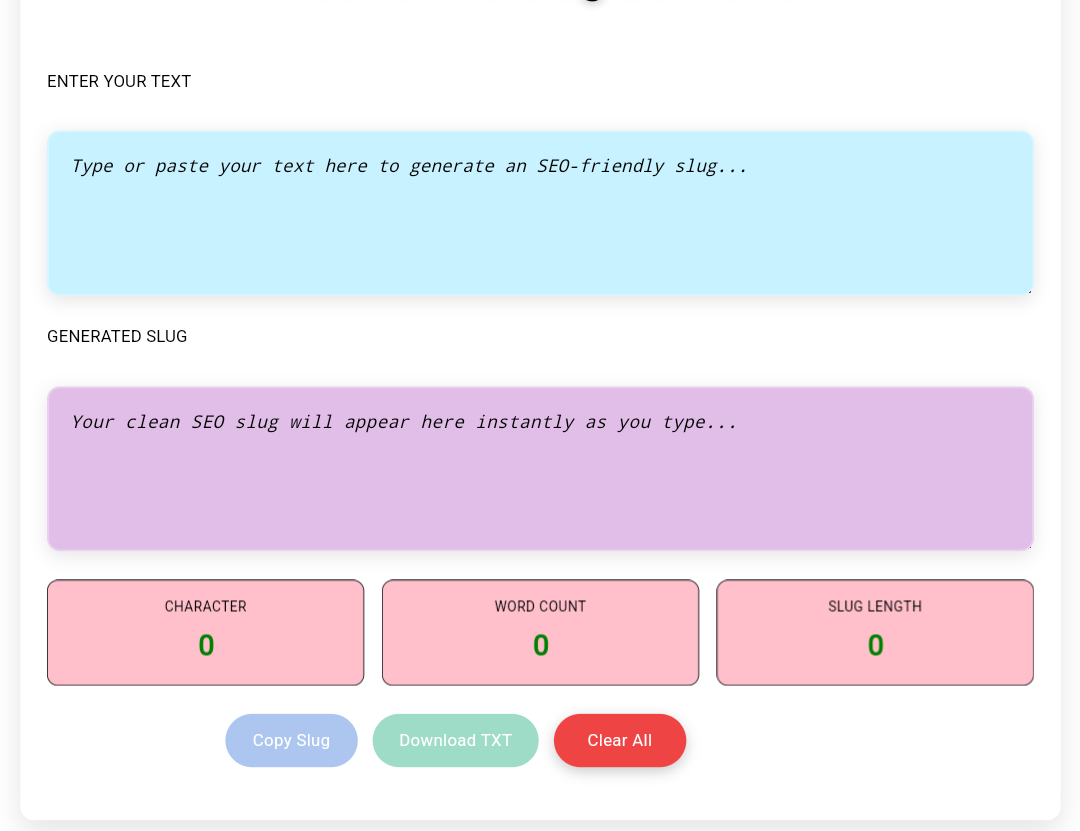
Using a Text to Slug Converter is simple. The tool takes your text and applies URL-friendly formatting automatically. The basic process is: Enter or paste your text into the input box. The tool converts letters to lowercase. Spaces are replaced with hyphens. Unnecessary special characters and symbols are removed. The generated slug appears instantly. The conversion happens directly in your browser, so you can generate a slug without waiting for server-side processing. This makes the tool convenient when you need to create multiple slugs quickly.
Core Features of Our Text to Slug Converter
Our Text to Slug Converter is designed to make slug creation simple and convenient without adding unnecessary complexity.
Some of its useful features include:
Instant Slug Generation
Enter your text and the tool generates the slug in real time, making it easy to see the result immediately.
Automatic Lowercase Conversion
The converter changes uppercase letters into lowercase characters to create a consistent URL-friendly format.
Removal of Special Characters
Characters and symbols that are not needed in a basic slug are removed automatically, helping produce a cleaner result.
Clean, URL-Friendly Output
The generated result is formatted specifically for use as a readable URL slug.
One-Click Copy
Once your slug is generated, you can copy it quickly using the built-in copy option.
Download as a TXT File
You can also download the generated slug as a TXT file when you need to save or reuse the result.
Character Counter
The tool displays character information so you can quickly see the size of your generated text and slug.
Word Counter and Slug Length
The built-in counters help you keep track of the original text and the resulting slug length.
Mobile-Friendly Design
The converter is designed to work across smartphones, tablets, laptops, and desktop computers.
No Registration Required
You can use the tool without creating an account or completing a registration process.
Browser-Based Processing
Your text is processed directly in your browser rather than being uploaded to a server. This makes the conversion quick and convenient.
Who Can Benefit from This Tool?
Almost anyone who works with online content can benefit from a Text to Slug Converter.
Bloggers
Bloggers publish articles regularly and often need to create clean URLs from post titles. A slug converter can reduce the time spent manually formatting each URL.
SEO Professionals
SEO professionals frequently review and optimize URL structures as part of broader on-page SEO work. A slug converter can make the formatting process faster.
Content Writers
Writers can turn article titles and working topics into readable slugs before sending content to editors, publishers, or website owners.
Digital Marketers
Digital marketers create landing pages, guides, campaigns, and other online resources. Descriptive slugs can make the resulting links easier to understand and share.
Business Owners
Small businesses, service providers, and online stores can use descriptive URLs to make their website links clearer and easier for visitors to understand.
Real-Life Examples of Text-to-Slug Conversion
Here are a few examples showing how normal text can be converted into a clean slug.
Example 1
Input: Best Mobile Phones Under ₹20,000
Output: best-mobile-phones-under-20000
Example 2
Input: Free AI Tools for Content Writers
Output: free-ai-tools-for-content-writers
Example 3
Input: Complete Guide to WordPress SEO
Output: complete-guide-to-wordpress-seo
Characters such as **&, %, #, @, !, ?, and *** are generally not needed in a basic readable slug. For example, instead of:
best-seo-tools-2026!!!
you can use:
best-seo-tools-2026
The result is shorter, cleaner, and easier to read.
Best Practices for Clean URLs
Knowing what is a slug is only the first step. You should also follow a few practical guidelines when creating slugs.
Use Hyphens Instead of Underscores
Use hyphens to separate words in a URL.
For example:
best-free-seo-tools
is easier to read as separate words than:
best_free_seo_tools
Hyphens are commonly used as word separators in URLs.
Avoid Unnecessary Changes
Once a page has been published and indexed, avoid changing its slug unless there is a good reason to do so.
Changing an established URL can affect existing links and bookmarks. If you do need to change a published URL, make sure the old URL is properly redirected to the new one where appropriate.
Keep the Slug Short and Descriptive
A slug should communicate the main topic of the page without unnecessary words or excessive length.
For example:
how-to-improve-website-speed
is more useful than a long slug containing every word from the article title.
Use Relevant Words
Choose words that accurately describe the page content. You do not need to add keywords simply for the sake of optimization.
A natural, descriptive slug is usually better than a URL filled with repeated or unrelated keywords.
Avoid Keyword Stuffing
Do not add multiple variations of the same keyword or unrelated terms to a slug.
For example:
best-seo-tools-seo-tools-seo-2026
is unnecessarily repetitive.
A cleaner option would be:
best-seo-tools-2026
Where Can You Use Generated Slugs?
A Text to Slug Converter is useful for more than standard blog posts. You can create slugs for many different types of pages, including:
Blog article URLs Website pages Category and directory paths E-commerce product pages
Product category pages Portfolio pages
Case studies Campaign landing pages
Educational resources Documentation pages
Online guides and tutorials Whether you manage a personal blog, business website, online store, or content platform, generating consistent slugs can make URL management easier.
Why We Built This Tool
There are many slug generators available online, but we wanted to create a tool that focuses on simplicity and practical use.
Our URL Slug Generator is designed to generate clean, readable slugs without requiring complicated settings or registration.
You can enter your text, view the generated slug instantly, check its length and word information, copy the result, or download it as a TXT file.
The tool processes the conversion directly in your browser, making it convenient for quick URL formatting. We do not claim that it is the only or absolute best Text to Slug Converter on the internet. Instead, our goal is to provide a straightforward tool that helps users create URL-friendly slugs quickly and easily.
Your feedback can also help us improve the tool and make it more useful over time.
Frequently Asked Questions
What is a slug?
A slug is the readable portion of a URL that identifies a specific page or post. For example, in example.com/seo-tips, the slug is generally seo-tips.
What is a slug in SEO?
A slug in SEO is the descriptive part of a URL used to identify a page or post. A clear and relevant slug can make a URL easier for users to understand and can provide useful context about the page.
What is a slug in WordPress?
A WordPress slug is the URL-friendly name assigned to a post, page, category, or other WordPress content. WordPress can generate a slug automatically from a title, and you can edit it when needed.
Is this url slug generator free?
Yes. You can use the Text to Slug Converter for free without creating an account or paying a fee.
Does the url slug generator work on mobile devices?
Yes. The tool is designed to work on smartphones, tablets, laptops, and desktop computers.
Can I copy or download the generated slug?
Yes. The tool includes a one-click copy option and allows you to download the generated slug as a TXT file.
Is my text stored on a server?
No. The tool processes your text directly in your browser and does not upload or store the text on our server.
Does a slug affect SEO?
A descriptive slug can help make a URL clearer and easier to understand, but it should not be treated as a guarantee of higher rankings. Good URL structure is only one small part of a broader SEO strategy.
Should I change my slug after publishing a page?
Generally, you should avoid changing an established slug unless there is a good reason. If you change a published URL, use an appropriate redirect from the old URL to the new one so visitors and existing links can still reach the content.
Final Thoughts
Understanding what is a slug makes it easier to create clear and organized website URLs. A good slug is generally short, descriptive, readable, and relevant to the page it represents. Instead of manually removing spaces, symbols, and unnecessary formatting, you can use a url Slug Generator to generate a clean URL-friendly slug within seconds. Whether you are a blogger, SEO professional, content writer, digital marketer, developer, or business owner, a simple slug generator can save time when creating URLs.
Try different titles and phrases with our Text to Slug Converter, check the generated result, copy or download it, and use a clear slug for your next webpage or article.