
How Many Words Per Page in a Novel?( Calculator & Guide)
Introduction: The Challenge of Estimating Document Length
Have you ever finished typing out a long assignment, a corporate report, or a personal blog post, only to sit back and wonder just how many physical pages it will actually fill? It is one of those universal questions that trips up everyone from university students rushing to meet strict submission guidelines to freelance copywriters and professional authors trying to map out a manuscript. When you are staring at a massive wall of text in a word processor, word count alone rarely tells the whole story.
Most people still try to solve this puzzle through rough mental guesses or trial-and-error formatting adjustments. Unfortunately, this manual approach is notoriously inaccurate. Real-world page count is influenced by a lot more than just the raw number of words you have typed. Subtle details like your choice of font size, line spacing, paragraph margins, and visual elements completely alter how text maps onto a physical page.
This is precisely where a dedicated Words Per Page Calculator changes the game. Instead of guessing or wasting time constantly changing margins, the tool instantly computes your estimated page count based on your total word count and your chosen words-per-page parameter. It streamlines your workflow, eliminates stress, and ensures your documents hit the exact target length before you hit print or submit.
When starting a creative writing project, authors often find themselves asking, How Many Words Per Page in a Novel? before they even finish the first chapter. In this comprehensive guide, we will break down everything you need to know about calculating page length from word counts, the core variables that affect formatting, and how you can optimize your documents like a pro.
What Is a Words Per Page Calculator?
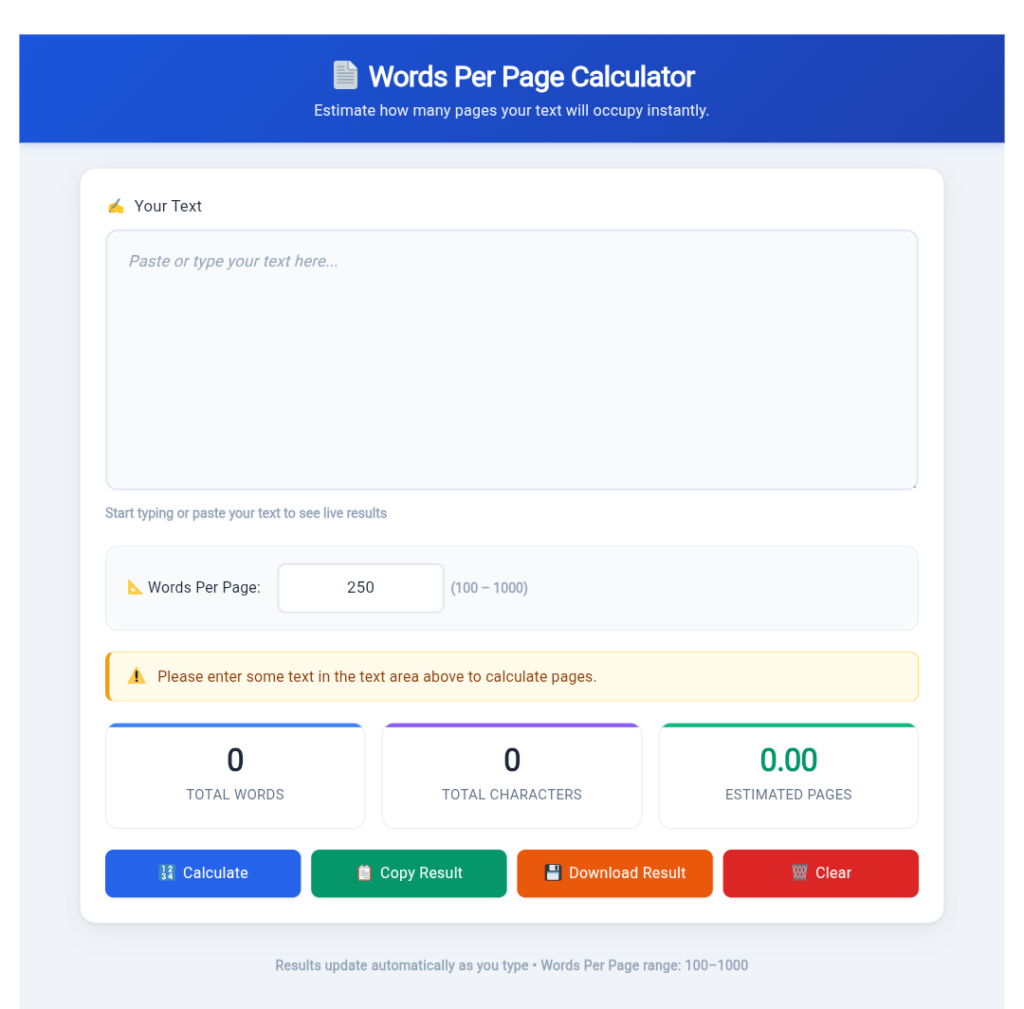
A Words Per Page Calculator is a smart, utility-based online tool designed to estimate how many pages your text will take up based on your overall word count. Rather than manually dividing lines or relying on guesswork, you simply paste your text or type directly into the interface, pick a target words-per-page value, and get an immediate estimation.
For instance, if your draft sits at 1,500 words and you configure the tool to use a standard layout of 300 words per page, the calculator instantly outputs an estimate of 5 pages. If you adjust your formatting parameters down to 250 words per page for double-spaced academic requirements, the estimate automatically shifts to 6 pages.
Modern web-based tools do much more than just divide numbers. They usually feature real-time counters tracking total words, characters (with and without spaces), paragraphs, and reading time. Because these calculations run locally in your web browser, the process happens in milliseconds without forcing you to upload sensitive files to an external server. This guarantees absolute privacy for your personal journals, business strategies, or unpublished book chapters.
Why Document Length Estimation Matters
Knowing the exact or approximate length of your writing project before it is finalized offers immense practical advantages across different industries.
- For Students and Academics: Educational institutions are notoriously strict about length requirements. Submitting an essay that falls short of a minimum page count or blows past a maximum limit can directly impact your grade. Page estimation helps you pad or trim your arguments before submission.
- For Content Creators and Marketers: When you are designing downloadable PDFs, lead magnets, whitepapers, or printable checklists, you need to know how the layout flows visually. Page estimation helps organize layouts cleanly.
- For Business Professionals: Corporate proposals, executive summaries, and standard operating procedures require tight formatting control. Knowing your layout length keeps presentations concise and professional.
- For Authors and Novelists: Tracking progress by page count rather than just raw word count provides a tangible sense of momentum when writing a book.
How a Words Per Page Calculator Works
The underlying math behind these tools is straightforward, but its practical application depends entirely on contextual variables. At its core, the tool counts every individual word in your text block and divides that sum by your chosen density factor:
Estimated Pages = Total Words ÷ Words Per Page Value
While the formula is simple, selecting the correct density factor is what guarantees accuracy. A densely packed technical paper with a tiny 10-point font and single spacing will squeeze far more words onto a single sheet than a double-spaced student essay.
Core Factors That Influence Page Length
Two documents containing the exact same number of words can easily result in completely different physical page counts depending on how they are formatted. Understanding these variables is crucial for accurate estimation.
1. Font Size and Choice
Font sizing is arguably the heaviest driver of page inflation or compression. Standard academic guidelines typically mandate a 12-point font like Times New Roman or Calibri. If you shift up to a 14-point or 16-point font for readability or formatting preference, your text expands rapidly, consuming more pages. Furthermore, different font families have different character widths. A wide font like Comic Sans takes up significantly more horizontal and vertical space than a compact font like Arial.
2. Line Spacing
Line spacing dictates the vertical breathing room between your sentences. Single-spaced text packs dense information into every inch of vertical space, whereas double-spaced formatting creates massive gaps, effectively doubling your page count without adding a single new word.
3. Margins and Page Layout
Standard professional and academic layouts use one-inch margins on all sides. Shrinking those margins to half an inch gives you extra printable area, driving up your words per page. Conversely, wide margins reduce your text block and inflate your total page count.
4. Paragraph Spacing and Headings
Modern web writing and clean document design rely heavily on structural breathing room. Headings, subheadings, bulleted lists, and blank lines between paragraphs enhance readability, but they also break up the vertical flow of text, naturally increasing the overall page count.
Special Focus: Manuscript and Book Formatting
If you are writing long-form fiction or non-fiction, formatting rules change dramatically. To answer the burning question of How Many Words Per Page in a Novel?, a standard printed book usually contains around 250 to 300 words per page using a 12-point standard font in a traditional manuscript layout.
However, published books look very different from standard Word documents. Traditional publishers and self-publishing platforms (like Amazon KDP) use compact book sizes (such as 5.5 x 8.5 inches or 6 x 9 inches) with smaller font sizes (often 10.5 to 11 points) and tight professional leading.
If you are an aspiring author trying to gauge your manuscript’s physical length, understanding How Many Words Per Page in a Novel? is essential for tracking progress across chapters. A standard 80,000-word fiction novel generally translates to roughly 300 to 320 pages in a published book format, though a raw double-spaced Word manuscript manuscript might span nearly 320 to 400 pages during the editing phase.
A common question among self-publishers is How Many Words Per Page in a Novel? once standard publishing formats are applied, since layout adjustments directly impact printing costs and spine thickness.
Whenever you sit down to map out your next book chapter, keeping the core calculation of How Many Words Per Page in a Novel? in mind will keep your publishing goals and pacing milestones entirely on track.
Standard Words Per Page Reference Table
To help you choose the right configuration for your specific project, use this general baseline reference table:
| Document Type / Style | Approximate Words Per Page | Best Suited For |
|---|---|---|
| Loose / Presentation | 100 – 150 words | Slides, large-print worksheets, children’s books |
| Standard Academic | 250 words | Double-spaced essays, college papers |
| Standard Business | 300 words | Professional reports, single-spaced articles, resumes |
| Compact Layout | 400 – 500 words | Dense legal documents, academic journals, non-fiction books |
| Maximum Density | 750 – 1000 words | Reference books, dictionaries, heavily compressed scripts |
Common Mistakes to Avoid When Estimating Pages
Even with the best tools available, writers often run into calculation errors due to a few common pitfalls:
- Assuming Universal Word Density: Believing that 500 words will always equal exactly two pages regardless of font size or spacing.
- Ignoring Non-Text Elements: Forgetting that images, data charts, tables, and block quotes consume massive vertical blocks of space that would otherwise hold text.
- Overlooking Preliminary Pages: Failing to account for title pages, tables of contents, bibliographies, and appendices in academic or corporate submissions.
- Using Mismatched Settings: Applying a book layout density setting (like 500 words per page) to a double-spaced college assignment.
Practical Tips for Accurate Estimation
- Match Your Output Destination: Always configure your calculator settings to mirror the final export format (e.g., matching your school’s exact margin and spacing rules).
- Monitor Continuously: Check your page progress incrementally during the drafting stage rather than waiting until the final hour before a deadline.
- Account for Visuals Early: If your report features graphics or tables, pad your estimated page budget to prevent unexpected overflows.
Conclusion
Mastering document length and understanding page estimation doesn’t have to be an exercise in frustration. By leveraging a fast, browser-based utility like the Toolstwenty Words Per Page Calculator, you can instantly determine how your raw word counts translate into real-world pages. Whether you are drafting a quick college essay, putting together a corporate brief, or tracking your milestone progress on a book manuscript, having reliable metrics puts you fully in control of your creative process.
Frequently Asked Questions (FAQs)
What is a Words Per Page Calculator?
It is an online utility tool that estimates the total physical page count of your document based on your active word count and selected formatting density parameters.
Is this calculator free to use?
Yes, you can run calculations freely online without needing to create an account, log in, or install third-party plugins.
How accurate are the page estimates?
Estimates are extremely reliable for text-heavy documents. However, final variations can occur if your document includes complex custom layouts, images, or unique font styles.
Can I input custom values into the tool?
Yes, most advanced calculators let you freely adjust words-per-page parameters (typically ranging from 100 up to 1000 words per page) to match your exact styling needs.
Does the calculator track characters as well?
Most modern calculators display real-time metrics for total words, characters with spaces, characters without spaces, and paragraphs.
Is my private data safe while using the tool?
Yes, calculations happen entirely client-side inside your web browser, ensuring your private documents are never uploaded or stored on an external server.
Latest Posts
- Bluehost Hosting Review 2026: Pricing, Plans & WordPress Hosting
- 12 Free SEO Tools for Websites & YouTube to Improve Your Content
- Systeme.io Review 2026: Pricing, Free Plan, Features & Sales Funnels
- What Is an Image Resizer? Image Dimensions, Pixels, Size & Resolution Explained
- Backwards Text: How to Write, Reverse & Copy Text Backwards
- Online Diff: The Ultimate Guide to Comparing Two Texts
- How to Remove Line Breaks in Excel, Word & Notepad
- How to Remove Duplicate Lines from Any Text (Guide)
- YouTube Title Ideas That Make Your Videos Easier to Discover
- How to Extract Tags From YouTube Videos: A Complete Guide