
Placeholder Text in Web Design: A Complete Lorem Ipsum Guide
In web design and digital product development, design and content do not always move at the same pace. Designers and developers often need to build page layouts, test typography, create responsive components, and check how an interface looks long before the final copy is ready.
This is where placeholder text in web design becomes useful. Instead of leaving empty spaces in a design or repeatedly using phrases such as “sample text here,” designers can use temporary text to see how a layout will look with realistic amounts of content.
The most familiar example is Lorem Ipsum, a type of dummy text that has been used in printing and design for centuries. Today, a Lorem Ipsum generator can create paragraphs, words, sentences, headings, lists, and other types of filler content in seconds. This makes it useful for website mockups, UI prototypes, HTML templates, typography testing, and responsive design.
In this guide, we will look at what placeholder text is, where Lorem Ipsum came from, why designers use it, how it helps developers test layouts, when contextual dummy data is a better choice, and how to use a Lorem Ipsum generator effectively.
1. What Is Placeholder Text in Web Design?
Placeholder text is temporary copy used in a design or prototype before the final content is available. It is also commonly called dummy text, filler text, or blind text.
The purpose is simple: it gives a content area something to display so designers can see how the finished layout may look. Instead of judging a page with empty boxes, a designer can see how headings, paragraphs, buttons, cards, menus, and other components behave when they contain text.
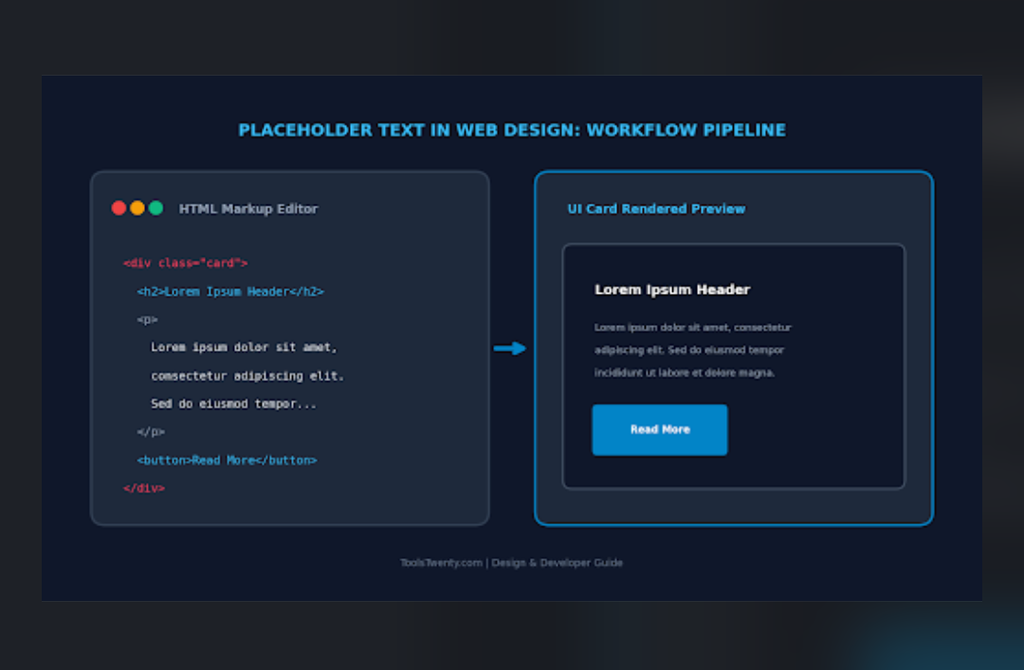
For example, a website designer might be creating a blog card with a heading, short description, and button. The final article may not have been written yet, but the designer still needs to know whether the card looks balanced.
Adding placeholder text makes it possible to test:
- Heading size and spacing
- Paragraph width and line height
- Card height
- Button placement
- Text wrapping
- Margins and padding
- Responsive behavior
- Overall visual balance
Lorem Ipsum is the most common form of placeholder text, but it is not the only option. Designers can also use short random phrases, realistic product information, mock customer data, or other contextual text when they need to test a specific type of interface.
2. What Is Lorem Ipsum?
Lorem Ipsum is dummy text traditionally used in graphic design, publishing, typography, and web development. It looks similar to Latin, but the standard Lorem Ipsum text used today has been altered enough that it does not provide a meaningful message.
A familiar opening is:
“Lorem ipsum dolor sit amet, consectetur adipiscing elit.”
Because the text does not communicate a normal message, it allows designers and clients to focus on the visual side of a design instead of reading the actual copy.
A Lorem Ipsum generator automates this process. Rather than manually copying and pasting a block of Lorem Ipsum, you can generate the amount and format of placeholder text you need for a particular design.
This is especially useful when you need different amounts of content for different components. A navigation item may need only a few words, while a blog layout may require several paragraphs.
3. The Historical Roots of Lorem Ipsum
Although Lorem Ipsum is now strongly associated with websites and digital design, its roots go much further back.
The commonly used Lorem Ipsum passage is derived from the writings of Marcus Tullius Cicero, particularly his philosophical work De Finibus Bonorum et Malorum (On the Ends of Good and Evil), written in 45 BC.
The original work was written in classical Latin and discussed philosophical ideas related to ethics, pleasure, pain, and human behavior. The familiar Lorem Ipsum text, however, is not simply a normal section of Cicero’s original work. The wording used as placeholder text has been altered and rearranged over time.
From Classical Text to Placeholder Copy
The reason for changing the original text was practical. Designers and printers needed text that looked like normal written language without distracting readers with an understandable story or message.
Using meaningful copy can make people start reading the words. Once that happens, their attention moves away from the design itself.
Lorem Ipsum solved that problem by providing text with realistic-looking word and sentence patterns while removing most of the meaningful context.
Lorem Ipsum in Print Design
Long before websites existed, designers and printers needed ways to preview typography and page layouts. Placeholder copy was used in print and typesetting workflows to show how a page would look when the final content was added.
In the 20th century, Lorem Ipsum became particularly familiar through typography and graphic design materials. Letraset, for example, popularized Lorem Ipsum passages through dry-transfer lettering sheets used by designers before desktop publishing became widespread.
As desktop publishing and later digital design tools became common, Lorem Ipsum continued to be used as a convenient source of sample text.
Today, the same basic idea is used in website builders, design applications, code editors, mockups, and online text generators.
4. Why Do Designers Use Lorem Ipsum?
One of the main reasons designers use Lorem Ipsum is to prevent content from becoming the main focus during early design reviews.
Imagine showing a client a website mockup filled with unfinished marketing copy. Instead of discussing the layout, the client may immediately start correcting sentences, changing headlines, or debating word choices.
That is useful later, when the content is ready for review. But during an early design stage, the main question may simply be whether the page works visually.
Placeholder text helps keep the discussion focused on the design.
Keeping Design Reviews Focused
Using dummy text allows teams to concentrate on questions such as:
- Does the heading have enough space?
- Is the paragraph too wide?
- Does the card look balanced?
- Is the button positioned correctly?
- Does the navigation fit on smaller screens?
- Is the font size comfortable to read?
- Does the page still look good when the amount of text changes?
This makes Lorem Ipsum particularly useful during wireframing and prototyping.
Simulating Real Text Distribution
A repeated phrase such as “sample text sample text sample text” does not behave visually like normal writing.
Real language contains words of different lengths, different sentence lengths, punctuation, and natural variation. Lorem Ipsum provides a more realistic block of text for testing typography and spacing.
It does not reproduce the exact behavior of every real language, but it is generally more useful for layout testing than repeatedly copying the same short phrase.
5. Common Uses of Placeholder Text in Web Design
Placeholder text can be useful in many parts of a website or application.
Website Mockups
Designers often use Lorem Ipsum when creating early versions of homepages, landing pages, blog layouts, and other website templates.
It allows them to see the relationship between headings, images, paragraphs, buttons, and other page elements before the final copy is available.
UI Cards
Cards often have limited space, so text length matters.
A card may contain a heading, description, metadata, and button. Generating different amounts of placeholder text helps designers check whether the card remains balanced when the content becomes longer or shorter.
Typography Testing
Lorem Ipsum is also useful for testing typography.
Developers and designers can use it to check:
- Font size
- Font weight
- Line height
- Letter spacing
- Paragraph width
- Heading hierarchy
- Text alignment
A design may look good with one short sentence but completely different when a paragraph fills the same space. Placeholder text makes these differences easier to see.
Responsive Web Design
A layout that looks perfect on a desktop screen may behave differently on a phone.
Adding different amounts of dummy text can help developers test whether text wraps correctly across different screen sizes.
This is especially useful for:
- CSS Grid layouts
- Flexbox components
- Navigation menus
- Product cards
- Blog excerpts
- Buttons
- Sidebars
- Mobile interfaces
6. Using a Lorem Ipsum Generator
Manually copying Lorem Ipsum is not necessary when you need a specific amount of placeholder text.
A Lorem Ipsum generator can create the text automatically based on the amount and format you need. For example, you may want a few words for a button or several paragraphs for a website mockup.
A typical workflow looks like this:
Step 1: Choose the Type of Content
Start by deciding what kind of placeholder content you need. Depending on the project, this could be words, sentences, paragraphs, headings, lists, or other structured content.
Short content is useful for small interface elements, while longer content is better for testing page sections and article layouts.
Step 2: Set the Quantity
Choose how much content you need.
If you are testing a small card, you may need only a few words or a short sentence. If you are building a complete article layout, several paragraphs may be more appropriate.
Matching the amount of filler text to the actual component helps produce a more realistic design.
Step 3: Select the Output Format
The format you choose depends on where the generated content will be used.
Plain text works well for design tools and general copy-and-paste use. HTML output is useful when you want structured content that can be placed directly into a webpage or code editor.
A generator that supports different syntax or formatting modes can save time because you do not have to manually add or remove tags later.
Step 4: Decide Whether to Start With the Traditional Lorem Ipsum Opening
Some designs look better when the generated text begins with the familiar:
“Lorem ipsum dolor sit amet…”
Other projects may benefit from generating content without always starting with the same opening.
Having this option gives you more control over how the filler text appears in your mockup.
Step 5: Generate and Copy or Download the Text
Once the settings are ready, generate the placeholder text.
You can then copy it directly into your design or development environment. For projects that require a separate file, downloading the generated content as a text or HTML file can also be useful.
7. How Our Lorem Ipsum Generator Helps
If you need placeholder text for a website, UI design, or development project, our free Lorem Ipsum Generator is designed to make the process quick and flexible.
The tool provides options for choosing the type and quantity of content, selecting a syntax mode, starting with the traditional Lorem Ipsum opening, and wrapping output with HTML tags. You can generate the text, copy it to your clipboard, or download the result as a TXT or HTML file. The tool also shows live statistics such as words, characters, sentences, and paragraphs or blocks.
This makes it useful for both simple design work and more structured development tasks.
Generate Different Types of Placeholder Content
Different interface components need different amounts and types of text.
For example:
- Words can be useful for short UI elements.
- Sentences can help test descriptions and small content areas.
- Paragraphs are useful for blog layouts and larger sections.
- Headings can be used to test heading styles and hierarchy.
- Lists can help test spacing and list styling.
- Blockquotes can be useful for article and editorial layouts.
Choosing content based on the component you are designing is more practical than filling every area with the same large block of text.
Use Plain Text or Structured Output
A plain text output is convenient when you are working in a design application or simply need text to paste somewhere.
HTML output is more useful when you are testing a webpage directly. Instead of manually creating paragraph, heading, list, or blockquote tags, structured placeholder output can give you content that is ready to test in a browser or code editor.
Copy or Download the Generated Result
Once the content has been generated, you can copy it directly for use in your project.
If you need to keep the result as a file, the generator also supports TXT and HTML downloads. This can be convenient when preparing test content for a development project or sharing sample content with another team member.
Check Text Statistics
The live statistics are useful when you need to know how much content has been generated.
Word count can help when testing a component with a specific text limit. Character count is useful for fields with character restrictions, while sentence and block counts can help when preparing longer mockups.
8. Plain Text, HTML, and Markdown Placeholder Content
The right output format depends on what you are building.
Plain Text
Plain text is useful for design applications such as Figma, Sketch, Canva, and similar tools.
Because it does not contain HTML markup, you can paste it into a text layer and format the typography using the design application’s own controls.
HTML Placeholder Text
HTML output is useful for frontend development.
For example, a developer may want to test how paragraphs, headings, lists, and blockquotes behave with their existing CSS. Instead of manually writing every tag around the filler text, structured HTML output can make the process faster.
Markdown
Markdown is useful in documentation, README files, static-site workflows, and other environments that support Markdown formatting.
The important point is to choose the format based on where the content will be used. A designer usually needs clean text, while a developer may need structured markup.
How to Add Placeholder Text in HTML (With Examples)
<!-- 1. Standard Paragraph Placeholder (Lorem Ipsum) -->
<p>
  Lorem ipsum dolor sit amet, consectetur adipiscing elit. Nullam in dui mauris.
  Vivamus hendrerit arcu sed erat molestie vehicula.
</p>

<!-- 2. HTML Form Input Field Placeholder -->
<label for="email">Email Address:</label>
<input type="email" id="email" name="email" placeholder="e.g. name@example.com">

<!-- 3. Textarea Placeholder Text -->
<label for="feedback">Your Feedback:</label>
<textarea id="feedback" name="feedback" rows="4" placeholder="Write your comments here..."></textarea>

<!-- 4. HTML Image & Logo Placeholder (Filler Image) -->
<img src="https://via.placeholder.com/300x150" alt="Placeholder Image Example" width="300" height="150">
9. Best Practices for Using Placeholder Text
Lorem Ipsum is useful, but it should be used carefully. Good placeholder content should help you test the design without creating problems later.
1. Match the Amount of Text to the Real Content
Try to estimate how much content the final component is likely to contain.
If a profile card will eventually have a short 100-character biography, filling it with several hundred words may give you an unrealistic layout.
On the other hand, if a page will eventually contain long articles, testing it with only one short sentence may hide potential layout problems.
The closer your placeholder content is to the expected final content, the more useful your prototype will be.
2. Test Short UI Text Separately
Not every part of a website needs a full Lorem Ipsum paragraph.
Buttons, navigation links, labels, and form controls usually contain only a few words.
Instead of putting “Lorem ipsum dolor sit amet” inside a button, use realistic short phrases such as:
- Submit Application
- Save Changes
- Read More
- Create Account
- Download File
This helps you test whether the interface can handle different real-world labels without clipping or awkward wrapping.
3. Test Longer Text as an Edge Case
You should also test content that is longer than expected.
A design may work perfectly with a short title but break when a product name or article headline is longer.
Testing both normal and longer text helps reveal problems with:
- Text wrapping
- Overflow
- Card heights
- Buttons
- Navigation
- Mobile layouts
- Truncation
4. Maintain a Proper Heading Structure
When using HTML placeholder content, keep the heading hierarchy meaningful.
A page should generally use headings according to their structure rather than choosing an <h2> or <h3> simply because its default font size looks good.
Proper heading structure is important for accessibility and makes the content easier to understand and maintain.
10. Lorem Ipsum vs. Realistic Dummy Data
Traditional Lorem Ipsum is excellent for many design tasks, but it is not suitable for every type of testing.
For example, imagine that you are designing an online shopping website.
A product card containing:
Lorem ipsum dolor sit amet…
does not tell you whether a real product name such as:
Wireless Noise-Canceling Headphones
will fit properly.
In this situation, contextual dummy data can be more useful.
Contextual dummy data means using realistic information that matches the type of application you are building.
An e-commerce prototype might use:
- Product names
- Prices
- Ratings
- Product descriptions
- Stock labels
- Shipping information
A dashboard might use:
- Customer names
- Dates
- Amounts
- Status labels
- Order numbers
This type of data gives you a better idea of how the final interface will behave.
When Traditional Lorem Ipsum Is Better
Use Lorem Ipsum when your main goal is to test:
- Typography
- Spacing
- General page structure
- Paragraph length
- Visual hierarchy
- Content density
- Basic responsive behavior
When Contextual Data Is Better
Use realistic dummy data when you need to test:
- Product names
- User profiles
- Financial information
- Dates and numbers
- Long names
- Domain-specific terminology
- Localization
- Real-world user interactions
The two approaches are not competitors. They solve different design problems.
11. Why Lorem Ipsum Is Not a Replacement for Final Content
Placeholder text should remain temporary.
Lorem Ipsum is useful because it does not have a meaningful message. But that is also its biggest limitation.
Real website content has to communicate something to the visitor. It needs to explain a product, answer a question, describe a service, provide instructions, or help the user complete a task.
Therefore, a finished website should replace placeholder text with meaningful content before launch.
This is particularly important for:
- Homepage copy
- Product descriptions
- Navigation labels
- Buttons
- Form instructions
- Blog posts
- Meta descriptions
- Image alt text
- Accessibility information
A design can be considered visually complete while still being content-incomplete.
12. Preventing Placeholder Text From Reaching Production
One common mistake is forgetting to replace temporary text before a website goes live.
A page containing large blocks of Lorem Ipsum may look unfinished to visitors and can provide little useful information.
Before publishing a new page, perform a simple content check for phrases such as:
- Lorem ipsum
- Dolor sit amet
- Sample text
- Placeholder text
- Insert text here
- Your content here
Development teams can also add automated checks to their build or deployment process.
For example, a simple search can flag common placeholder phrases before production deployment.
This is particularly helpful on larger websites where many pages or components are being developed by different people.
Check More Than the Main Page Content
A final review should also check:
- Page titles
- Meta descriptions
- Headings
- Buttons
- Forms
- Image alt text
- Footer content
- Error messages
- Hidden or template content
- Staging pages
The goal is simple: make sure temporary content has been replaced everywhere it matters.
13. Does Placeholder Text Affect SEO?
Placeholder text itself is not a problem when it is being used during design or development.
The problem occurs when unfinished pages containing large amounts of meaningless filler text are accidentally published and made accessible to search engines and users.
Such pages provide little useful information and may create a poor experience for visitors.
For that reason, unfinished or staging pages should be handled appropriately during development, and production pages should contain useful, original content before they are promoted as finished pages.
Do not rely on Lorem Ipsum as actual website copy. Search visitors need meaningful information that answers their questions or helps them complete their goals.
14. Placeholder Text and Accessibility
Placeholder content also deserves attention from an accessibility perspective.
If Lorem Ipsum remains on a live webpage, screen readers may read the meaningless text to users. This can make the page harder to understand.
There is also an important distinction between dummy text and an HTML form’s placeholder attribute.
A form placeholder such as:
Enter your email address
is intended to give the user a hint about what belongs in a field. It is not the same thing as Lorem Ipsum.
Form controls should still have clear labels and accessible instructions where needed.
When using dummy text in prototypes, think about how the final interface will be experienced by people using keyboards, screen readers, mobile devices, and other assistive technologies.
15. When Should You Use a Lorem Ipsum Generator?
A Lorem Ipsum generator is particularly useful when the final copy is not ready but you still need to continue working on the design.
Common situations include:
Website Development
Developers can populate templates with temporary text while the final content is being prepared.
UI and UX Prototyping
Designers can quickly fill cards, sections, menus, and other components instead of leaving empty spaces.
WordPress Theme Design
Placeholder paragraphs, headings, and lists can help test how a theme handles different types of content.
Typography Testing
Designers can generate enough text to see how fonts behave across paragraphs and headings.
Responsive Testing
Different text lengths can help reveal layout problems on mobile, tablet, and desktop screens.
HTML Development
Structured placeholder output can help developers test CSS and HTML components before production content is available.
16. How Much Lorem Ipsum Should You Generate?
There is no single correct amount of Lorem Ipsum for every project.
The best approach is to match the quantity to the component you are testing.
For example:
Short UI element: A few words may be enough.
Button or navigation item: Use a realistic two- or three-word phrase.
Card description: One short paragraph may be appropriate.
Blog article layout: Several paragraphs may be necessary.
Full-page design: Generate enough content to fill the major sections you want to test.
It is also useful to test both shorter and longer versions. Real content rarely has exactly the same length everywhere, so variation can reveal layout problems that uniform filler text might hide.
17. Final Checklist Before Replacing Placeholder Text
Before moving a design from prototype to production, check the following:
- Has all Lorem Ipsum been replaced?
- Are headings meaningful?
- Are button labels realistic?
- Are form instructions clear?
- Are image alt texts descriptive?
- Are meta titles and descriptions complete?
- Have long and short text cases been tested?
- Does the layout work on mobile?
- Does the HTML structure remain valid?
- Have staging or unfinished pages been handled correctly?
A few minutes of checking can prevent an unfinished-looking page from reaching your visitors.
Frequently Asked Questions About Placeholder Text and Lorem Ipsum
What is placeholder text in web design?
Placeholder text is temporary content used to fill a design or webpage before the final copy is available. It helps designers and developers test spacing, typography, responsive layouts, and content structure.
What is Lorem Ipsum used for?
Lorem Ipsum is mainly used as dummy or filler text during design and development. It allows teams to test how a layout looks without introducing meaningful copy that could distract people from the design.
Is Lorem Ipsum real Latin?
Lorem Ipsum is derived from classical Latin writing, particularly Cicero’s De Finibus Bonorum et Malorum. However, the Lorem Ipsum used today has been modified and rearranged, so it does not function as a meaningful Latin passage.
Why do designers use Lorem Ipsum instead of English?
Readable English naturally attracts attention because people try to understand and evaluate its meaning. Lorem Ipsum reduces that distraction and lets designers focus on layout, typography, spacing, and visual hierarchy.
What is a Lorem Ipsum generator?
A Lorem Ipsum generator is an online tool that automatically creates placeholder text. Depending on the generator, you can choose the amount and type of content and sometimes select formats such as plain text, HTML, or Markdown.
Can I generate Lorem Ipsum by words or paragraphs?
Yes. A generator can be used to create different amounts of filler text depending on what you are designing. Short outputs are useful for small interface elements, while paragraphs are better for larger sections and page layouts.
Can Lorem Ipsum be used for HTML testing?
Yes. HTML-formatted Lorem Ipsum is useful for testing webpage layouts and CSS. Structured output can include elements such as paragraphs, headings, lists, and blockquotes, making it easier to test how those elements appear in a browser.
Can I download generated Lorem Ipsum text?
Yes. Depending on the generator, generated content can be copied directly or downloaded as a file. Our Lorem Ipsum Generator supports TXT and HTML downloads, making it convenient for both design and development workflows.
Is Lorem Ipsum good for responsive design testing?
Yes. Placeholder text can help you test how text wraps and how components behave at different screen sizes. However, for more realistic testing, it is also useful to test with actual or contextual text because different languages and real-world content can have very different lengths.
Should I use Lorem Ipsum on a live website?
Generally, no. Lorem Ipsum is intended as temporary content. Production pages should contain meaningful text that explains the page, product, service, or information to visitors.
Does Lorem Ipsum hurt SEO?
Lorem Ipsum should not be treated as real website content. If unfinished pages containing large amounts of filler text are published and indexed, they provide little useful information to search visitors. Replace placeholder content with relevant, useful content before a page is considered production-ready.
Is placeholder text the same as a form placeholder?
No. Lorem Ipsum is dummy content used mainly for design and development. A form placeholder is short guidance displayed inside an input field, such as “Enter your email address.” Form placeholders should not replace proper labels.
When should I use contextual dummy data instead of Lorem Ipsum?
Use contextual dummy data when you need to test realistic information such as product names, prices, customer names, dates, addresses, or industry-specific terms. Lorem Ipsum is better when your main concern is general layout, typography, spacing, and content density.
Is a Lorem Ipsum generator useful for developers?
Yes. Developers can use generated placeholder content to test HTML structures, CSS layouts, responsive components, text wrapping, card heights, and other interface behaviors before the final content is available.
Is a Lorem Ipsum generator useful for designers?
Yes. Designers can use Lorem Ipsum to quickly fill mockups and prototypes, allowing them to evaluate typography, spacing, visual hierarchy, and the overall balance of a page without waiting for final copy.
Final Thoughts
Placeholder text is a simple but useful part of the web design and development process. It allows designers and developers to keep working even when the final copy is not ready.
Lorem Ipsum remains one of the most recognizable forms of dummy text because it provides realistic-looking text without giving readers a meaningful message to analyze. A good Lorem Ipsum generator makes the process even easier by allowing you to generate the amount and type of filler content you need instead of manually copying sample text.
For basic design work, plain Lorem Ipsum may be all you need. For frontend development, HTML-formatted output can make testing easier. And when you need to test real-world interface behavior, contextual dummy data can provide a better approximation of the final content.
The key is to treat placeholder text as exactly what it is: temporary content for testing and prototyping. Use it to build and refine your layout, test different text lengths, check responsive behavior, and prepare your interface. Then replace it with meaningful, user-focused content before the page goes live.